description: Google Cloud reference architectures for landing your isp6 IPv6 PA assignment in production: a single-region pattern with a regional External Application Load Balancer, and a mu
Reference Architectures: Google Cloud
Audience: isp6 members and Google Cloud architects who have completed (or are about to complete) the Google Cloud BYOIP onboarding and want a production-grade topology to land their /48 or /44 on. This article assumes the sizing decision from Sizing: /44 vs /48 has been made.
Last updated: May 2026
1. What's in this article
Two Google Cloud reference architectures, both built around a real isp6 PAP (Public Advertised Prefix, Google's name for BYOIP):
- Architecture A: a single-region production deployment. One PAP, one Regional PDP, one Global VPC with one regional subnet, a Regional External Application Load Balancer, a Managed Instance Group, and AlloyDB. The simplest production shape on GCP.
- Architecture B: a multi-region active/active deployment. One PAP feeds one Global PDP (for the anycast load balancer frontend) and one Regional PDP per region (for per-region backends). A single Global VPC spans both regions with Shared VPC. A Global External Application Load Balancer is the anycast frontend; backends are regional GKE clusters; Cloud Spanner provides the multi-region database.
Both architectures show the IPv6 / BYOIP plane only. Identity, governance, billing, FinOps, and the rest of the Google Cloud Architecture Framework sit on top of these unchanged.
For BYOIP mechanics (signed authorisation message, PAP validation, PDP creation,
RPKI ROA for 396982) read Bring Your Own IPv6 to Google Cloud.
2. Why GCP is unusual on IPv6 sizing
It is worth pausing on this because it changes the maths from Sizing: /44 vs /48. On AWS and Azure, each Region needs its own /48, because BYOIP is provisioned per-Region and the /48 is the longest globally-routable prefix.
Google Cloud is different. A single PAP is announced globally, so the same /48 appears at every Google PoP simultaneously, as an anycast prefix. One /48 is enough to serve every region you operate in, with a single global anycast frontend.
That doesn't mean a /44 is wasted on GCP. A /44 still gives you:
- Multiple PAPs for hard isolation between environments or business units (prod, non-prod, partner network), each with its own ownership chain and its own blast radius.
- Future multi-cloud headroom: the /44 is the unit of address ownership across AWS, Azure, GCP, and on-prem in the constellation pattern. A /44 brought partly into GCP today can have a /48 added to AWS tomorrow without a renumber.
So on GCP, the /48 vs /44 question becomes "how many independent ownership domains do I need?", not "how many Regions do I deploy in?".
3. Architecture A: single-region with a Regional External ALB
When to choose this: one Google Cloud region serves your traffic, one project, no anycast requirement (a single regional frontend is fine), and you want the simplest production topology that still uses BYOIP end-to-end.
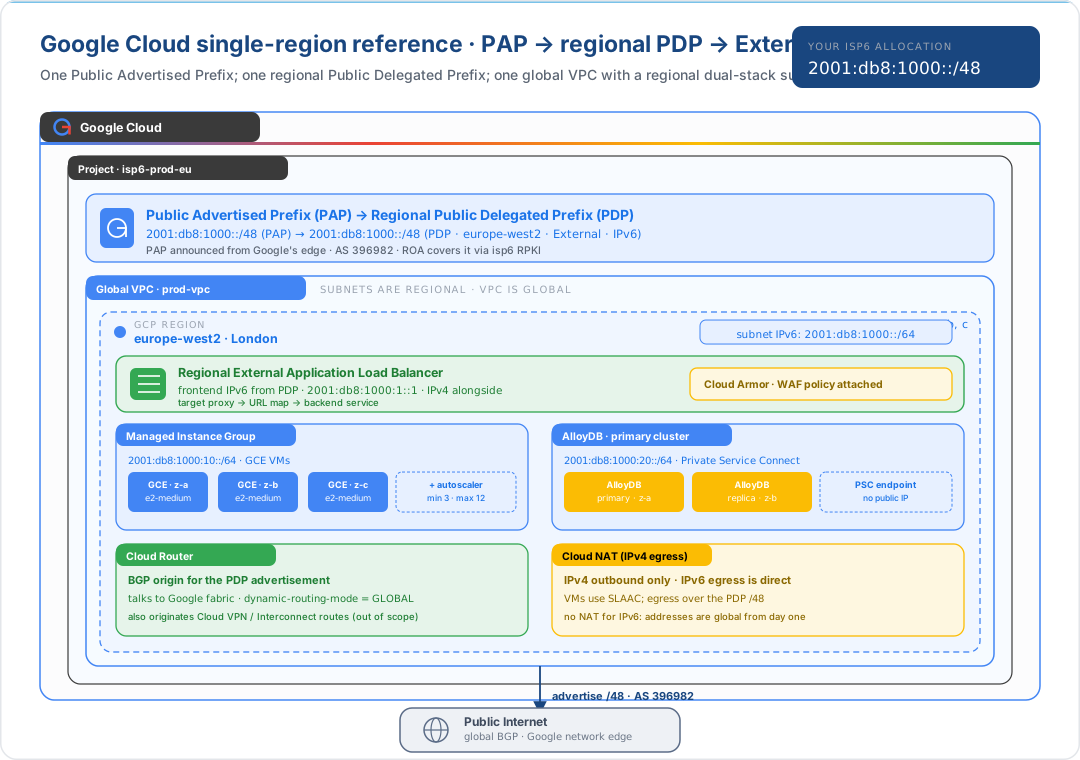
3.1 The PAP / PDP chain
| Resource | Scope | What it does |
|---|---|---|
| PAP (Public Advertised Prefix) | Global | The ownership root. It receives the signed authorisation message; once it is in ACTIVE state, Google's edge is announcing it worldwide as AS ` |
| PDP (Public Delegated Prefix) | Regional or Global | A sub-allocation drawn from a PAP. A Regional PDP can hand IPv6 addresses to anything in that region (LB frontends, VM NICs); a Global PDP feeds Global External Application Load Balancers |
| VPC subnet | Regional | A dual-stack subnet draws an IPv6 /64 from the regional PDP |
In Architecture A there is one PAP and one Regional PDP, and that is all you need to serve one region.
3.2 Why no per-Region BYOIP step
Unlike AWS (where each Region requires its own advertise-byoip-cidr) or Azure
(where each Region needs its own Regional Custom IP Prefix to be commissioned),
GCP's PAP is announced everywhere automatically when it becomes ACTIVE. Adding a
second region's workload doesn't require any BYOIP action; you create a Regional
PDP in the second region and a subnet that draws from it, and you are done.
That is also what makes Architecture B straightforward: going from one region to two has no BYOIP action attached to it at all.
4. Architecture B: multi-region active/active with one global VPC
When to choose this: you want anycast, a single client-facing IPv6 address that resolves to the nearest of multiple regions, with failover between them. You have at least one team comfortable with regional GKE / Compute Engine, and you want Google Cloud's defining-feature topology: one VPC, many regions, one frontend.
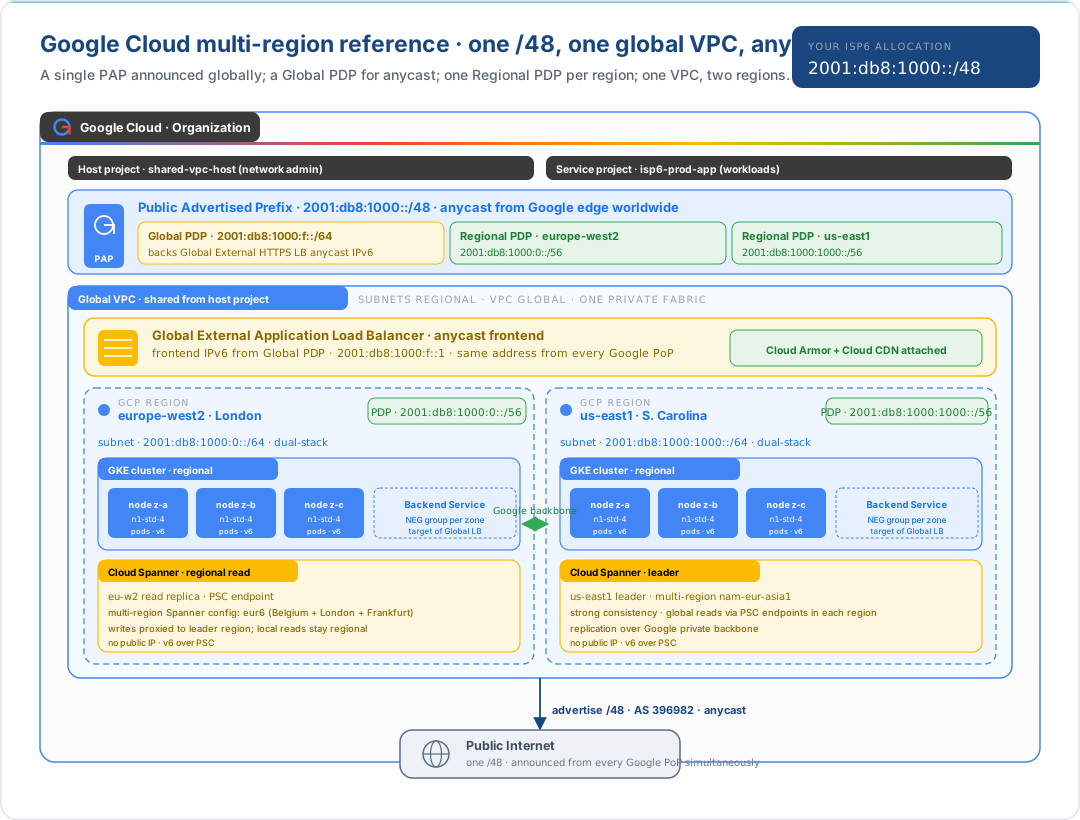
4.1 What's actually anycast
The Global External Application Load Balancer has an anycast IPv6 frontend
address drawn from the Global PDP, for example 2001:db8:1000:f::1. Clients
worldwide resolve example.com to that address; the Google network drops their
packets onto the nearest Google PoP; the load balancer there picks a backend
in the nearest healthy region. The backend hop is over Google's private
backbone, not the public internet.
The Regional PDPs are not anycast; each one is regional. They give you addresses for things that have to be regional: direct-attached VM NIC IPs, regional load balancer frontends, PSC endpoints. In this diagram they sit behind the global LB; clients never see them.
4.2 Shared VPC, host project, service projects
| Project | Owner | Holds |
|---|---|---|
shared-vpc-host |
Network admin team | The Global VPC, the PAP, the PDPs, firewall rules |
isp6-prod-app |
Application team | The GKE clusters, MIGs, AlloyDB instances, LB and target proxy resources, consuming the host project's subnets |
This split is the GCP canon: one project owns the network and the address-space plane; each application project consumes those constructs without owning them. Cross-project IAM grants the application project the right to attach workloads to the host project's subnets.
4.3 Where the data lives
Cloud Spanner with a multi-region configuration (e.g. nam-eur-asia1) gives the
application a single global, strongly-consistent database, with reads served
from the local region and writes proxied to the leader. Spanner endpoints are
private (Private Service Connect), so no public IP is involved and no part of
the data plane touches the BYOIP /48, by design. The /48 is for client-facing
traffic only.
AlloyDB or Cloud SQL with cross-region read replicas are alternatives if you don't need Spanner's consistency model; the architecture above generalises.
5. Google-Cloud-specific design rules
GCP-specific gotchas that shape these architectures and that don't apply to AWS or Azure:
- VPCs are global; subnets are regional. This sounds simple but reshapes almost everything. There is no inter-region peering to set up between subnets in the same VPC; they're already on the same fabric.
dynamic-routing-mode = GLOBALis the right default for any multi-region VPC, so Cloud Router-learned routes propagate across regions. The default isREGIONAL.- The PAP is the BGP-origin object. Deleting a PAP withdraws the prefix from every Google edge, and there is no per-region withdraw. Plan deprovisioning carefully; see BYOIP §11.
- A PAP and a PDP must be in the same address family. Don't try to mix v4 and v6 in a single PAP.
- Cloud NAT does not exist for IPv6. Every IPv6 address is global from day one; egress is direct. Don't deploy Cloud NAT thinking it covers IPv6, because it doesn't, and it shouldn't.
- Firewall rules need explicit IPv6 entries. Like AWS Security Groups and Azure NSGs, a v4 rule does not cover v6. Audit firewall policies when turning on IPv6.
- Cloud Load Balancing has many flavours. This article uses:
- Regional External Application Load Balancer in Architecture A
- Global External Application Load Balancer in Architecture B for anycast
Check the official LB feature matrix before choosing: IPv6 support, anycast behaviour, and BYOIP-frontend support all vary across SKUs.
6. What's intentionally out of scope
| Topic | Where to read |
|---|---|
| BYOIP onboarding, costs, lifecycle | Bring Your Own IPv6 to Google Cloud |
| Sizing decision (/48 vs /44) | Sizing: /44 vs /48 |
| Internal /48 carving | Planning Your isp6 Allocation |
| Organisation policy, IAM, billing | Google Cloud Architecture Framework |
| Cloud Spanner / AlloyDB design beyond IPv6 | Spanner documentation |
The IPv6 / PAP layer slots underneath those frameworks without changing their conclusions.
7. Further reading
Other reference architectures in this series
- Reference Architectures: An Overview
- Reference Architectures: AWS
- Reference Architectures: Azure
- Reference Architectures: On-Premises and Colocation
isp6 knowledge base
- Bring Your Own IPv6 to Google Cloud: PAP / PDP mechanics, ownership, ROAs, costs
- Sizing: /44 vs /48
- Planning Your isp6 Allocation
Google documentation
- Bring your own IP overview (BYOIP)
- Configure BYOIP: IPv6
- VPC network overview
- Dual-stack subnets
- Shared VPC overview
- Cloud Load Balancing: features
- Google Cloud Architecture Framework
IETF
- RFC 6177: IPv6 Address Assignment to End Sites
- RFC 7454: BGP Operations and Security
- RFC 3849: IPv6 Address Prefix Reserved for Documentation
8. PAP / PDP rollout: quick checklist
If your prefix isn't reachable from the public internet, a subnet can't draw from your Public Delegated Prefix, or gcloud compute public-advertised-prefixes describe returns a state you w
The commands below use the
2001:db8::/48documentation prefix (RFC 3849),europe-west2as the region, andisp6-byoipas the resource name prefix. Substitute your real isp6/48, target region, and naming. Google Cloud BYOIP CLI behaviour, return codes, and state-machine transitions are defined by Google and may change, so treat the Google Cloud references listed at the end of this section as authoritative.
Step 1: generate the signed authorisation in the isp6 console
In the subnet dashboard for the /48 you're bringing to Google Cloud, the cloud panel produces two values using the private key from your onboarding step 9:
pki_certificate: the X.509 ownership certificatesigned_message: the RSA signature over the Google-format authorisation string
Both are required by gcloud compute public-advertised-prefixes create. Google validates the signed message against the certificate, then independently validates the ROA via RPKI for the prefix's origin ASN (Google ASN 396982). Re-generating the signature is idempotent and safe.
Step 2: create the Public Advertised Prefix (validates ownership)
gcloud compute public-advertised-prefixes create isp6-byoip-pap \
  --range=2001:db8::/48 \
  --dns-verification-ip=2001:db8::1 \
  --pki-cert=/path/to/pki_certificate.pem
(Some gcloud versions and --pki-cert / --signed-message argument names vary, so see the authoritative CLI reference below for the syntax that matches your installed gcloud.)
Google validates ownership (PKI signature + RPKI). Validation can take minutes to hours. The PAP transitions through INITIAL → PTR_CONFIGURED → VALIDATED. Until it reaches VALIDATED, you cannot announce it.
Step 3: announce the PAP (starts BGP advertisement)
gcloud compute public-advertised-prefixes update isp6-byoip-pap --announce-prefix
This is the BGP-advertisement switch. Until it runs, traffic destined for your prefix won't reach Google Cloud even though the PAP exists and is validated. State transitions VALIDATED → ANNOUNCED. Reversible via --withdraw-prefix.
Step 4: create a Public Delegated Prefix per region
The PAP is globally announced, but for any GCP resource (subnet, forwarding rule, Cloud NAT) to draw an address from it, you need at least one PDP scoped to a region:
gcloud compute public-delegated-prefixes create isp6-byoip-pdp-euwest2 \
  --public-advertised-prefix=isp6-byoip-pap \
  --range=2001:db8::/48 \
  --region=europe-west2
(For a single-region rollout the PDP range can equal the PAP range. For multi-region active/active, sub-divide the /48 into per-region slices, though note GCP's limitations around sub-/4
Step 5: verify with the describe / list calls
gcloud compute public-advertised-prefixes describe isp6-byoip-pap \
  --format='value(status, ipCidrRange, sharedSecret)'

gcloud compute public-advertised-prefixes list \
  --format='table(name, ipCidrRange, status)'

gcloud compute public-delegated-prefixes list \
  --format='table(name, ipCidrRange, region, status)'
Expected output on a healthy rollout:
- The PAP's
statusisANNOUNCED. Anything else (INITIAL,PTR_CONFIGURED,VALIDATED,REVERSE_DNS_LOOKUP_FAILED,PREFIX_CONFIGURATION_IN_PROGRESS,PREFIX_REMOVAL_IN_PROGRESS) means a step is incomplete, in progress, or has failed validation. - The PDP's
statusisREADY(somegcloudversions reportANNOUNCED). The PDP must beREADYbefore a subnet or forwarding rule can allocate from it. - The
ipCidrRangeon both matches your isp6/48exactly.
Common failure modes
| Symptom | Likely cause |
|---|---|
public-advertised-prefixes create returns INVALID_ARGUMENT referencing the signed message |
Stale or mis-copied PKI cert / signed_message. Re-generate in the isp6 console and retry. |
Stuck in INITIAL / PTR_CONFIGURED for >2h |
RDAP-derived ownership check failing, or reverse-DNS PTR for --dns-verification-ip not yet set. Configure the PTR on the isp6 subnet dashboard and wait for it to propagate before retrying. |
--announce-prefix returns an error referencing RPKI |
Your ROA doesn't authorise ASN 396982 for the prefix. Update the ROA via the isp6 subnet dashboard's cloud panel (Google preset) and wait for RPKI propagation. |
| PDP create succeeds but a subnet can't draw from it | PDP status is not yet READY, or you're trying to allocate outside the PDP's range. |
| Prefix not reachable from the public internet | PAP not yet ANNOUNCED, or no GCP resource (Cloud NAT, forwarding rule, subnet) is actually advertising an address from the PDP. The PAP being announced alone does not make any specific address reachable. |
Authoritative references
Google owns this lifecycle end-to-end. If anything in this checklist disagrees with Google's documentation, Google wins:
- Bring your own IP overview (BYOIP)
- Configure BYOIP: IPv6
gcloud compute public-advertised-prefixes: CLI referencegcloud compute public-delegated-prefixes: CLI reference- Manage Public Advertised Prefixes
- Manage Public Delegated Prefixes
This document is provided for informational purposes. Protocol specifications and cloud provider behaviour are subject to change. Consult the linked RFCs and vendor documentation for authoritative, up-to-date information before making architectural decisions.