Stop Thinking in IPv4: Misconceptions That Sabotage Your IPv6 Deployment
Audience: isp6 members, cloud architects, network engineers, and security practitioners migrating workloads to IPv6, especially those with years of IPv4 muscle memory.
Last updated: April 2026
1. Introduction
Engineers who have spent years optimising IPv4 networks bring hard-won instincts to IPv6 deployments. Many of those instincts (conserve addresses, block ICMP, hide behind NAT) were rational responses to IPv4's constraints. But applying them to IPv6 is like rationing water in a submarine: the scarcity model no longer fits.
This document identifies the most common IPv4 reflexes that actively harm an IPv6 deployment, explains why they made sense in IPv4, and shows what to do instead.
If you are an isp6 member deploying your PA assignment for the first time, whether via BYOIP to a cloud provider or on your own infrastructure, these are the mental model shifts that will determine whether your deployment succeeds cleanly or stalls on problems that were solved at the protocol level years ago.
If you are entirely new to the protocol, start with Designing the Next Internet: An Introduction to IPv6 for a ground-up tour of address anatomy, scopes, and the SLAAC bootstrap. This article then corrects the IPv4 reflexes that most commonly survive into a fresh IPv6 deployment.
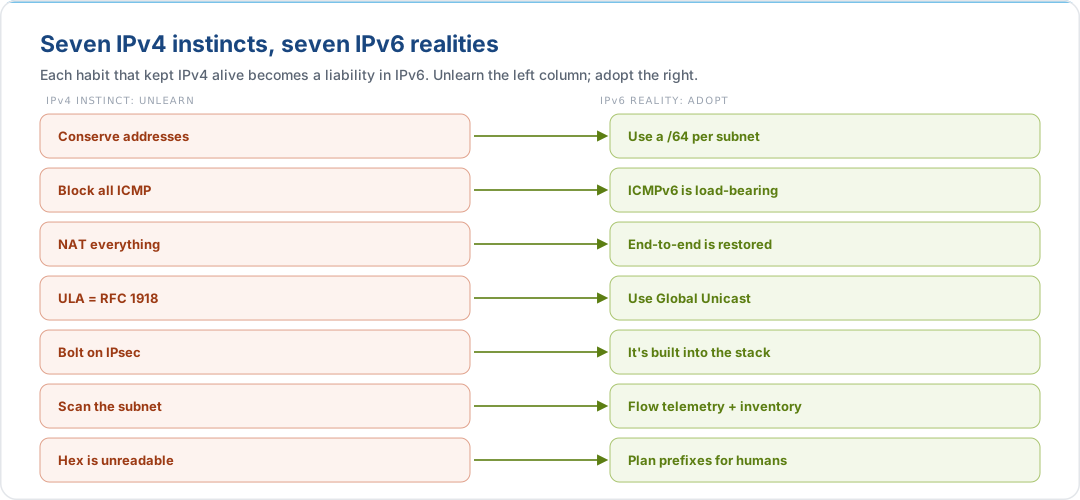
2. Misconception 1: Microsegment Your Subnets
The IPv4 Instinct
In IPv4, address space is scarce and expensive. A /24 gives you 254 usable hosts, and wasting addresses on a subnet with only three servers feels irresponsible. So we learned to carve /28s, /29s, and /30s, and spent years managing the resulting VLSM complexity.
Why It's Wrong in IPv6
A single /64 subnet contains 2^64 addresses, roughly 18.4 quintillion. That is more addresses in one subnet than the entire IPv4 internet has in total. Splitting a /64 into /80s or /96s to "avoid waste" is a reflex from a scarcity model that no longer applies.
More importantly, it breaks things. Core IPv6 mechanisms depend on a /64 boundary:
| Mechanism | Why It Needs /64 | What Breaks If You Go Smaller |
|---|---|---|
| SLAAC (Stateless Address Autoconfiguration) | Hosts generate a 64-bit Interface ID and combine it with the 64-bit prefix from Router Advertisements | Hosts cannot auto-configure addresses; deployment requires manual addressing or full DHCPv6 |
| EUI-64 Interface IDs | The modified EUI-64 algorithm embeds the 48-bit MAC into a 64-bit Interface ID | Interface ID generation fails; connectivity breaks silently |
| Privacy Extensions (RFC 8981) | Random 64-bit Interface IDs rotate periodically for privacy | Privacy addresses cannot be generated; tracking surface increases |
| NDP (Neighbor Discovery Protocol) | Optimised for /64; lookup tables and solicited-node multicast assume 64 bits of host space | Performance degradation; potential neighbour cache exhaustion |
| Secure Neighbor Discovery (SEND) | Cryptographic address generation requires the full 64-bit Interface ID space | Cryptographic proofs fail validation |
The Rule
Give every subnet a /64. No exceptions for end-host subnets.
The only legitimate deviations from /64 are defined by the IETF:
| Prefix Length | Use Case | Reference |
|---|---|---|
| /127 | Point-to-point inter-router links | RFC 6164 |
| /128 | Loopback and anycast addresses | Convention / RFC 4291 |
| /64 | Everything else | RFC 4291, RFC 7421 |
The /127 exception is not just about conserving nibbles. It closes a real attack surface. A p2p link numbered as a full /64 exposes roughly 18 quintillion unconfigured addresses on the router's interface. An attacker flooding that range forces the router into perpetual Layer 2 resolution, filling the neighbour cache and starving legitimate traffic, a Neighbor Cache Exhaustion attack (RFC 6583). A /127 restricts the active space to two addresses (one per end), eliminating the attack surface entirely. Reserve the full /64 in your IPAM for the link, but configure /127 on the interfaces. See Planning your isp6 allocation for the threat model and configuration pattern.
Prefix Paranoia: The Numbers
Engineers who accept the /64 rule intellectually still hesitate to allocate generously, fearing they will "run out" of prefixes. The global data says otherwise:
- Even with worldwide IPv6 adoption approaching 50%, only 0.7% of the
2000::/3global unicast allocation is in use (APNIC IPv6 measurement). - Within a typical enterprise /48, fewer than 0.1% of the available 65,536 /64 subnets are utilised.
Do not compromise your routing topology or avoid clean nibble boundaries to save a resource that will not run out. Assign /64s freely: one per VLAN, one per availability zone, one per service tier. The address space is not the constraint; your numbering discipline is.
What This Means in Practice
A /48 allocation, the standard enterprise assignment and the minimum for AWS BYOIP, gives you 65,536 /64 subnets. That is more subnets than most organisations will ever need.
2001:db8:acad::/48
| /64 Subnet | Purpose |
|---|---|
2001:db8:acad:1::/64 |
Production / AZ-a |
2001:db8:acad:2::/64 |
Production / AZ-b |
2001:db8:acad:3::/64 |
Production / AZ-c |
2001:db8:acad:10::/64 |
Staging / AZ-a |
2001:db8:acad:11::/64 |
Staging / AZ-b |
2001:db8:acad:20::/64 |
Management |
2001:db8:acad:30::/64 |
CI/CD runners |
If you hold a /44 allocation from isp6, the hierarchy gains a third tier. A /44 contains 16 /48 blocks, sized to assign one /48 per cloud region or per account. Each region's /48 is then subdivided into /64 subnets for its availability zones and service tiers, following the same model as the single-region case above, independently per region. The last nibble of the third address group selects the region; the fourth group selects the subnet within that region.
2001:db8:a100::/44 (16 × /48 available)
| Region | /48 Block | /64 Subnet | Purpose |
|---|---|---|---|
| eu-west-1 | 2001:db8:a100::/48 |
2001:db8:a100:1::/64 |
Prod / AZ-a |
2001:db8:a100:2::/64 |
Prod / AZ-b | ||
2001:db8:a100:3::/64 |
Prod / AZ-c | ||
| eu-central-1 | 2001:db8:a101::/48 |
2001:db8:a101:1::/64 |
Prod / AZ-a |
2001:db8:a101:2::/64 |
Prod / AZ-b | ||
2001:db8:a101:3::/64 |
Prod / AZ-c | ||
| us-east-1 | 2001:db8:a102::/48 |
2001:db8:a102:1::/64 |
Prod / AZ-a |
2001:db8:a102:2::/64 |
Prod / AZ-b | ||
2001:db8:a102:3::/64 |
Prod / AZ-c |
3. Misconception 2: Block All ICMP
The IPv4 Instinct
In IPv4, ICMP was treated as a security liability. Smurf attacks, ICMP redirect abuse, and network reconnaissance via ping sweeps led to a widespread "block all ICMP" firewall posture. For IPv4, this was aggressive but broadly survivable, since TCP and UDP continued to function, and Path MTU Discovery failures could (sometimes) be masked by MSS clamping.
Why It's Catastrophic in IPv6
In IPv6, ICMPv6 is not optional. It holds the stack up. Blocking ICMPv6 indiscriminately does not just degrade performance; it breaks fundamental network operations that have no alternative mechanism.
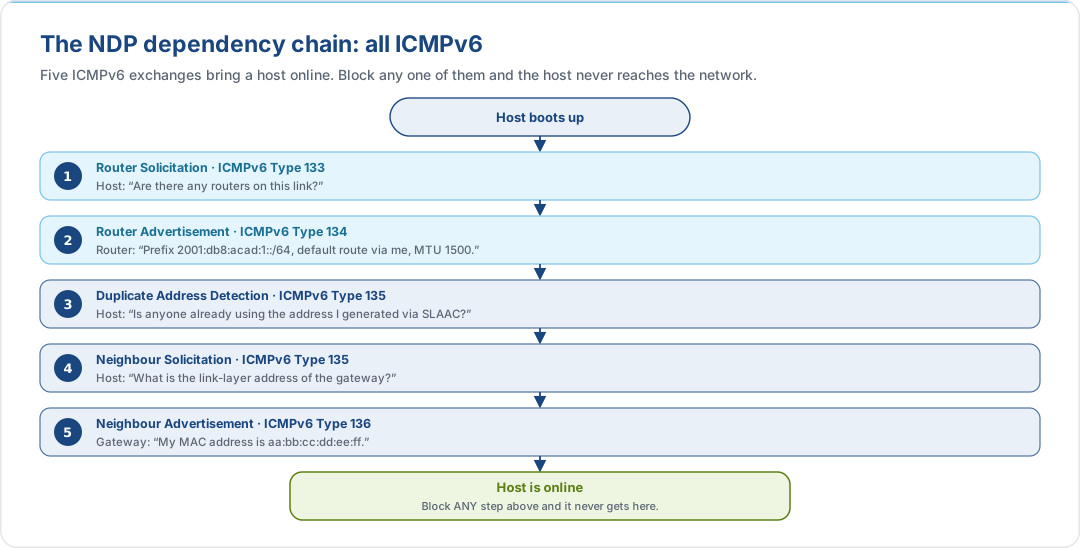
ICMPv6 (RFC 4443) subsumes the functions of ARP, ICMP, and IGMP from the IPv4 world. The Neighbor Discovery Protocol (NDP, RFC 4861) runs entirely over ICMPv6. Block it, and your hosts cannot discover routers, resolve link-layer addresses, or detect duplicate addresses.
ICMPv6 Message Types: What They Do and What Breaks
The table below categorises the essential ICMPv6 messages. For the full filtering guidance, see RFC 4890.
Error Messages (Types 1–127): Must Not Be Dropped
| Type | Name | Function | Impact If Blocked |
|---|---|---|---|
| 1 | Destination Unreachable | Informs sender that a destination or port is unreachable | Connections hang instead of failing fast; applications experience long timeouts |
| 2 | Packet Too Big | Carries the MTU of the constraining link; essential for PMTUD | Path MTU Discovery breaks; TCP connections stall or fail on links with MTU < 1500 (common in tunnels, VPNs) |
| 3 | Time Exceeded | Hop limit expired (equivalent to IPv4 TTL exceeded) | Traceroute stops working; routing loops go undetected |
| 4 | Parameter Problem | Malformed header or unknown extension header | Silent packet drops; extremely difficult to debug |
NDP Messages (Types 133–137): Must Not Be Dropped on Local Links
| Type | Name | Function | Impact If Blocked |
|---|---|---|---|
| 133 | Router Solicitation (RS) | Host asks for Router Advertisements on startup | Hosts cannot discover their default gateway or obtain prefix information |
| 134 | Router Advertisement (RA) | Router announces prefixes, MTU, and default route | No SLAAC, no default route, no on-link determination, so total connectivity failure |
| 135 | Neighbor Solicitation (NS) | Link-layer address resolution (replaces ARP) and Duplicate Address Detection (DAD) | Cannot resolve MAC addresses; duplicate IPs go undetected; all unicast forwarding breaks |
| 136 | Neighbor Advertisement (NA) | Response to NS; link-layer address confirmation | Same as above, and address resolution fails |
| 137 | Redirect | Router informs host of a better first-hop for a destination | Suboptimal routing; increased latency for affected flows |
Multicast Listener Discovery (Types 130–132, 143)
| Type | Name | Function | Impact If Blocked |
|---|---|---|---|
| 130 | MLD Query | Router queries hosts for multicast group membership | Multicast groups not maintained; NDP multicast breaks |
| 131 | MLDv1 Report | Host reports multicast group membership | Switch/router cannot learn which groups are active |
| 132 | MLDv1 Done | Host leaves a multicast group | Stale multicast state; wasted bandwidth |
| 143 | MLDv2 Report | Enhanced membership reporting | Same as MLDv1 Report |
Informational Messages (Types 128–129)
| Type | Name | Function | Recommendation |
|---|---|---|---|
| 128 | Echo Request | ping6, operational troubleshooting |
Allow (rate-limit if desired) |
| 129 | Echo Reply | Response to Echo Request | Allow |
The NDP Dependency Chain
To understand why you cannot "just block a few types," consider how NDP messages depend on each other:
ICMPv6 in the Cloud (AWS)
In AWS, the infrastructure handles NDP at the hypervisor level, so your EC2 instances do not need to process raw Router Advertisements or Neighbor Solicitations themselves. However, ICMPv6 still matters:
- Security Groups are stateful and automatically allow return ICMPv6 traffic (including Packet Too Big) for established connections. If you configure a security group to allow outbound IPv6 traffic, the inbound PMTUD response is permitted implicitly.
- Network ACLs are stateless. You must explicitly allow ICMPv6 Type 2 (Packet Too Big) inbound if you use NACLs, or PMTUD will break for traffic traversing tunnels or VPN links with reduced MTU.
- Echo Request/Reply (Types 128/129) must be explicitly allowed in security groups
if you want
ping6to work; AWS does not allow these by default.
See AWS Security Group Rules Reference for ICMPv6 configuration examples.
The Rule
Do not apply a blanket "deny all ICMPv6" policy. Follow RFC 4890 for filtering guidance. At minimum, always permit Types 1–4 (errors), 128–129 (echo), and 133–136 (NDP).
4. Misconception 3: You Still Need NAT
Why NAT Exists in IPv4
NAT was never a security feature. It was a survival mechanism. When the IETF realised in the early 1990s that the 4.3 billion IPv4 addresses would not be enough, NAT (RFC 3022) was introduced to allow multiple hosts to share a single public address. It became ubiquitous because it solved three practical problems simultaneously:
| Problem | How NAT Solved It (IPv4) |
|---|---|
| Address exhaustion | Many-to-one mapping: hundreds of hosts behind one public IP |
| Perceived security | Internal addresses are hidden; unsolicited inbound traffic is dropped by the stateful NAT table |
| Provider independence | Internal addressing can remain stable when changing ISPs (using RFC 1918 space internally) |
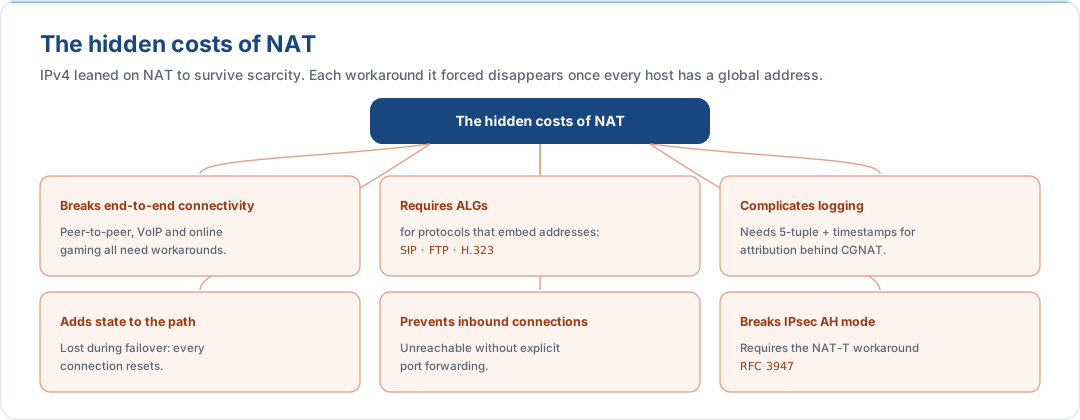
These were real benefits in IPv4. But they came at a significant cost:
Why IPv6 Doesn't Need It
IPv6 eliminates the root cause: there is no address scarcity. A single /48 allocation provides 65,536 /64 subnets, each with 2^64 host addresses. Every device gets a globally unique address. With scarcity gone, the three problems NAT solved in IPv4 are addressed differently:
| IPv4 Problem | IPv6 Solution | Mechanism |
|---|---|---|
| Address exhaustion | Eliminated | 128-bit address space; RIR allocations are effectively unlimited |
| Security / topology hiding | Stateful firewalls + Privacy Extensions | Firewalls provide the same "default deny inbound" posture without address translation. Privacy Extensions (RFC 8981) rotate the Interface ID, preventing tracking. |
| Provider independence | BYOIP or ULA + NPTv6 | Bring your isp6 PA assignment to any cloud provider via BYOIP (see the AWS, Azure, and Google Cloud guides), or use ULA (RFC 4193) internally with NPTv6 (RFC 6296) for prefix translation at the border |
RFC 4864 ("Local Network Protection for IPv6") formally documents how IPv6 achieves equivalent or better protection than NAT44 without address translation.
The End-to-End Principle Restored
Without NAT, IPv6 restores the original design intent of IP: any host can communicate directly with any other host, constrained only by policy (firewalls), not by architectural translation layers. This simplifies:
- Peer-to-peer protocols: WebRTC, SIP, and gaming work without STUN/TURN/ICE traversal hacks.
- Logging and forensics: source addresses are globally meaningful; no need to correlate NAT translation logs with flow records.
- IPsec: AH and ESP work end-to-end without NAT Traversal encapsulation.
- Application architecture: no ALGs, no port forwarding rules, no hairpin NAT.
When Translation Still Appears in IPv6
The IETF explicitly recommends against NAT for IPv6 (RFC 6296, Section 1). However, two translation mechanisms exist for specific transition scenarios:
| Mechanism | Purpose | When to Use |
|---|---|---|
| NAT64 (RFC 6146) | Translates between IPv6 clients and IPv4-only servers | Transition tool for reaching legacy IPv4 services from an IPv6-only network |
| NPTv6 (RFC 6296) | Stateless 1:1 prefix translation (IPv6-to-IPv6) | Multi-homing with PA (Provider Aggregatable) space from multiple ISPs; avoids the need for PI space. Preserves end-to-end reachability (unlike NAT44). |
Neither of these is "NAT as you know it." NAT64 is a transition crutch that should be retired as IPv4 dependencies are eliminated. NPTv6 is stateless, checksum-neutral, and does not map ports, so it avoids the worst pathologies of NAT44.
The Rule
Do not deploy NAT66 (stateful IPv6-to-IPv6 NAT). Use stateful firewalls for security, Privacy Extensions for topology hiding, and BYOIP or NPTv6 for provider independence. Use NAT64 only as a transition mechanism to reach IPv4-only endpoints.
5. Misconception 4: ULA Is the New RFC 1918
The IPv4 Instinct
In IPv4, RFC 1918 private addresses
(10.0.0.0/8, 172.16.0.0/12, 192.168.0.0/16) are the bedrock of enterprise
networking. Every data centre, every corporate LAN, every home router uses them.
When engineers accept that NAT is unnecessary in IPv6, their next instinct is to reach
for the closest equivalent: Unique Local Addresses
(ULA, RFC 4193, fc00::/7).
The reasoning seems sound: "We don't need NAT, but we still want private, non-internet-routable addresses for internal traffic." ULA appears to be exactly that.
Why It's a Trap
ULA has two structural problems that make it a poor default for enterprise IPv6 deployments:
1. Architectural Limitations
| Problem | Detail |
|---|---|
| Single /48 per site | ULA provides one fd00::/48 prefix per site. For a small office this is fine; for a multi-region enterprise with hundreds of VLANs across cloud accounts and data centres, a single /48 is a severe constraint. Compare this with a /44 GUA allocation from isp6, which provides 16 × /48 blocks. |
| Collision domains | The RFC mandates that the 40-bit Global ID be generated using a pseudo-random algorithm. In practice, implementers routinely hard-code values (fd00::, fd01::) or copy examples. When two organisations with overlapping ULA prefixes merge networks, or connect via VPN, the result is a silent addressing collision with no resolution path short of renumbering. |
| No global routability | ULA is explicitly filtered by upstream providers. If you later need to expose an internal service externally, or peer with a partner, you must renumber to GUA, the same painful migration you were trying to avoid. |
2. RFC 6724 Kills Your IPv6 Traffic
This is the subtle, devastating problem. On a dual-stack host (IPv4 + IPv6), the operating system uses RFC 6724 ("Default Address Selection for IPv6") to decide which source and destination address to prefer when multiple options exist.
RFC 6724's default policy table ranks address types by precedence:
| Prefix | Precedence | Label | Address Type |
|---|---|---|---|
::1/128 |
50 | 0 | Loopback |
::/0 |
40 | 1 | Global Unicast (GUA) |
::ffff:0:0/96 |
35 | 4 | IPv4-mapped (i.e., IPv4) |
fc00::/7 |
30 | 13 | ULA |
2002::/16 |
30 | 2 | 6to4 |
2001::/32 |
5 | 6 | Teredo |
ULA (precedence 30) ranks below IPv4-mapped addresses (precedence 35). On a dual-stack host with both an IPv4 address and a ULA IPv6 address, the operating system will always prefer IPv4. You can engineer a flawless dual-stack network, publish AAAA DNS records, and configure every router correctly, and your IPv6 traffic will remain at zero because the host's address selection algorithm deprioritises ULA in favour of IPv4.
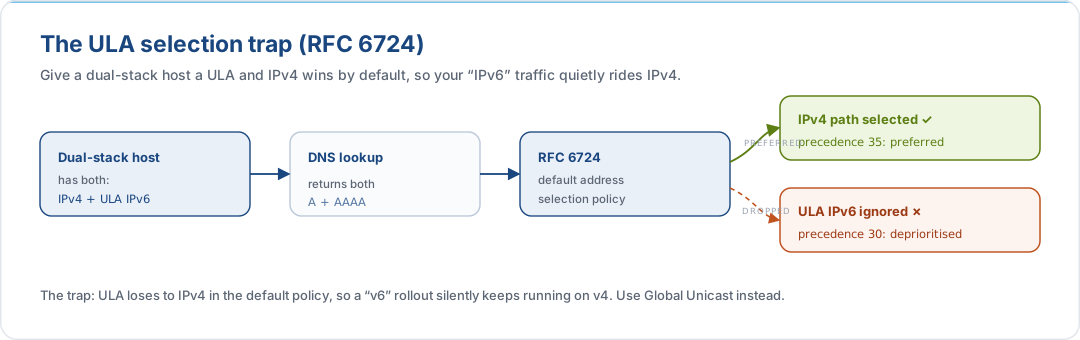
This is not a misconfiguration. It is the correct, standards-compliant behaviour. The only way to ensure IPv6 is preferred on dual-stack hosts is to use Global Unicast Addresses, which have a higher precedence than IPv4-mapped addresses.
The Rule
Use Global Unicast Addresses (GUA) as your default IPv6 addressing strategy. ULA is not the IPv6 equivalent of RFC 1918. It is a niche tool for air-gapped networks that will never need internet connectivity. For everything else, use GUA from your isp6 allocation behind stateful firewalls. If you need multi-homing without PI space, use NPTv6 (RFC 6296) with GUA, not ULA.
6. Misconception 5: You Need to Bolt On IPsec
The IPv4 Instinct
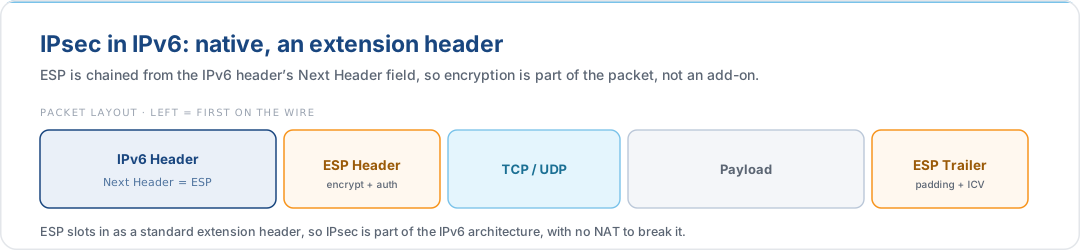
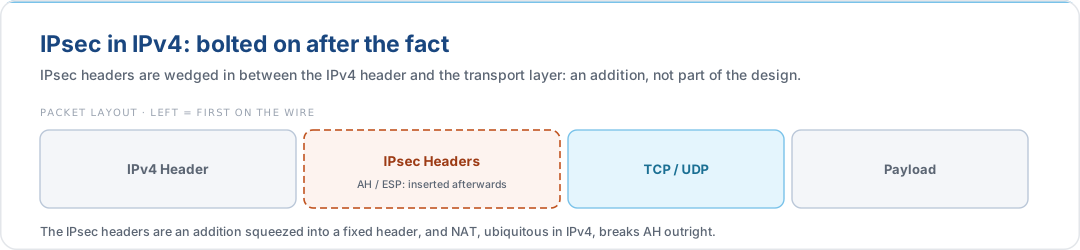
In IPv4, IPsec was an afterthought, a separate protocol suite layered on top of a network layer that had no native security. Deploying IPsec meant additional software, configuration complexity, and often dedicated hardware accelerators. Many organisations avoided it entirely, relying instead on TLS at the application layer.
IPv6: IPsec Is Part of the Architecture
IPv6 was designed with IPsec as an integral part of the protocol stack, not an add-on. The two IPsec headers, Authentication Header (AH, RFC 4302) and Encapsulating Security Payload (ESP, RFC 4303), are defined as IPv6 extension headers, processed natively by the IPv6 stack.
What Changed: MUST → SHOULD
The requirement level for IPsec support in IPv6 implementations has evolved:
| RFC | Year | IPsec Requirement | Status |
|---|---|---|---|
| RFC 2460 | 1998 | MUST implement IPsec | Original IPv6 spec |
| RFC 4294 | 2006 | MUST implement IPsec (AH + ESP) | IPv6 Node Requirements |
| RFC 6434 | 2011 | SHOULD implement IPsec | Relaxed; acknowledged that TLS/SSH/DTLS cover many use cases |
| RFC 8200 | 2017 | SHOULD implement IPsec | Current IPv6 spec (obsoletes RFC 2460) |
The downgrade from MUST to SHOULD reflects practical reality: not every constrained device (IoT sensors, embedded systems) can implement full IKEv2 + ESP. But for servers, network infrastructure, and cloud workloads, IPsec support is present in the stack by default. You do not need to install additional software or purchase dedicated appliances. The capability is there, ready to be configured.
What This Means for Your Deployment
- Host-to-host encryption is available without TLS termination proxies or VPN tunnels. ESP in transport mode encrypts the payload between two IPv6 hosts with no intermediate infrastructure.
- Network-to-network tunnels (ESP in tunnel mode) work cleanly because there is no NAT in the path to interfere with AH integrity checks or require NAT-T encapsulation.
- IPsec is not a replacement for TLS. Use IPsec for network-layer encryption (host-to-host, site-to-site); use TLS for application-layer authentication and encryption. They complement each other.
- In cloud environments (AWS, GCP, Azure), managed VPN and transit gateway services handle IPsec tunnel negotiation. The "built-in" nature of IPsec in IPv6 means the overhead of establishing these tunnels is lower, but the operational model is similar to IPv4 VPNs.
The Rule
Do not treat IPsec as something you need to "add" to IPv6. It is already part of the protocol architecture. Plan your encryption strategy knowing that every IPv6 node in your infrastructure (excluding constrained IoT devices) already has IPsec capability in its network stack.
7. Misconception 6: Scan the Subnet to Find Hosts
The IPv4 Instinct
In IPv4, vulnerability scanning and host discovery are straightforward. A /24 subnet
has 254 usable addresses. A security team can enumerate every host in seconds with
nmap -sn 192.168.1.0/24, run a full port scan of the entire subnet in minutes, and
maintain a near-real-time inventory of every device on the network. This brute-force
approach works because the search space is small enough to exhaust.
Many organisations build their entire security posture on this foundation: periodic subnet scans, vulnerability assessments against discovered hosts, and compliance reports showing "100% of assets scanned." The implicit assumption is that scanning the address range is equivalent to scanning the network.
Why It's Impossible in IPv6
A single /64 subnet contains 2^64 addresses, approximately 1.8 × 10^19 (18.4 quintillion). To put this in perspective:
| Scenario | Time Required |
|---|---|
| Scan a /24 at 1,000 packets/sec | ~0.25 seconds |
| Scan a /64 at 1,000 packets/sec | ~584 million years |
| Scan a /64 at 1,000,000 packets/sec | ~584,000 years |
| Scan a /64 at line rate (100 Gbps) | ~36,000 years |
Even at theoretical line rate, scanning a single /64 takes longer than recorded human history. The brute-force approach that underpins IPv4 security scanning is mathematically impossible in IPv6.
This is not a temporary tooling gap. It is a fundamental property of the address space. No amount of hardware or parallelism will make exhaustive /64 scanning viable.
What to Do Instead
IPv6 requires a shift from address-space enumeration to active host inventory and flow telemetry. You cannot find hosts by scanning for them; you must know where they are because you put them there or because they announced themselves.
| IPv4 Approach | IPv6 Replacement | How It Works |
|---|---|---|
| Ping sweep / ARP scan | NDP monitoring | Passively observe Neighbor Solicitation and Advertisement traffic to discover active hosts on a link (RFC 4861) |
| Full subnet port scan | Flow telemetry (NetFlow v9, IPFIX) | Analyse traffic flows to identify active hosts, services, and communication patterns. IPFIX (RFC 7011) natively supports IPv6 flow keys |
| Scheduled vulnerability scan of IP range | Agent-based scanning | Deploy scanning agents on hosts that report back to a central console. The scanner knows the host exists because the agent is installed, not because it was found by probing |
| Asset inventory by subnet scan | IPAM / CMDB integration | Authoritative host inventory from your IP Address Management system and Configuration Management Database, not from network probes |
| Compliance: "100% of addresses scanned" | Compliance: "100% of known hosts scanned" | Redefine coverage in terms of registered assets, not address ranges |
In cloud environments, this shift is already the norm. AWS, GCP, and Azure maintain authoritative registries of every ENI, NIC, and VM, so you query the cloud API for your inventory, not the network. IPv6 extends this principle to on-premises and hybrid networks.
The Rule
Do not attempt to scan IPv6 subnets by address range. Build your security posture on authoritative host inventories (IPAM, CMDB, cloud APIs), NDP monitoring, and flow telemetry. Redefine "complete coverage" as "all known assets scanned," not "all addresses probed."
8. Bonus: Taming the Hex: Readable Firewall Rules
The Problem
A 128-bit address written in hexadecimal is intimidating. When engineers see firewall
rules referencing 2001:0db8:acad:0042:a9f3:2e1b:8c05:7d3a/128, cognitive load
spikes and misconfigurations follow. This leads to a perverse outcome: teams avoid
writing granular IPv6 firewall policies because the addresses are "too hard to read."
The Solution: Plan Your Prefixes for Humans
The vast address space of IPv6 is not just about scale. It is an opportunity to encode meaning into your addressing scheme. When you control your prefix allocation (as you do with BYOIP), you can design subnet IDs that are simple, sequential, and self-documenting.
Example: A Readable Allocation Scheme
Starting from a /48 allocation of 2001:db8:acad::/48, assign subnet IDs using a
simple ascending pattern that encodes environment and purpose:
Allocation: 2001:db8:acad::/48
| Subnet ID | Prefix | Purpose |
|---|---|---|
0001 |
2001:db8:acad:1::/64 |
Prod / Web Tier |
0002 |
2001:db8:acad:2::/64 |
Prod / App Tier |
0003 |
2001:db8:acad:3::/64 |
Prod / Data Tier |
0004 |
2001:db8:acad:4::/64 |
Prod / Cache |
0010 |
2001:db8:acad:10::/64 |
Staging / Web |
0011 |
2001:db8:acad:11::/64 |
Staging / App |
0012 |
2001:db8:acad:12::/64 |
Staging / Data |
0020 |
2001:db8:acad:20::/64 |
Dev / Web |
0021 |
2001:db8:acad:21::/64 |
Dev / App |
0030 |
2001:db8:acad:30::/64 |
Management |
0031 |
2001:db8:acad:31::/64 |
Monitoring |
00f0 |
2001:db8:acad:f0::/64 |
CI/CD Runners |
00f1 |
2001:db8:acad:f1::/64 |
Build Agents |
Firewall Rules That Read Like English
With this scheme, firewall and security group rules become self-documenting. Compare:
Before (unplanned addressing):
  Source: 2001:db8:acad:a3f2::/64
  Dest:   2001:db8:acad:7b01::/64
  Port:   443
  Action: ALLOW

  # What does this rule do? No one knows without a spreadsheet.
After (planned addressing):
  Source: 2001:db8:acad:1::/64     # Prod / Web Tier
  Dest:   2001:db8:acad:2::/64     # Prod / App Tier
  Port:   443
  Action: ALLOW

  # Web tier can reach App tier on HTTPS. Obvious.
Aggregation for Broad Policies
By aligning your numbering to nibble boundaries (multiples of 4 bits), you can write aggregate rules that cover entire environments with a single prefix:
| Aggregate Prefix | Covers | Use in Policy |
|---|---|---|
2001:db8:acad::/52 |
Subnet IDs 0000–0fff (Production + Staging) |
"All production and staging subnets" |
2001:db8:acad:1::/64 to 2001:db8:acad:4::/64 |
Production tiers 1–4 | "All production tiers" |
2001:db8:acad:10::/60 |
Subnet IDs 0010–001f (Staging) |
"All staging subnets" |
2001:db8:acad:20::/60 |
Subnet IDs 0020–002f (Dev) |
"All dev subnets" |
2001:db8:acad:30::/60 |
Subnet IDs 0030–003f (Management) |
"All management subnets" |
Tip: Align your subnet numbering to nibble boundaries (/52, /56, /60) so that route aggregation and firewall summarisation work cleanly. A /60 gives you 16 contiguous /64 subnets, usually enough for one environment. Plan this before you assign the first address.
Avoid the Mapping Trap
A tempting shortcut is to preserve IPv4 muscle memory by embedding the old octets
inside IPv6 hex strings, for example assigning 10.0.0.1 as
2001:db8:acad::1000:0001, or folding a /24 into the final nibble group. Do not do
this. The IPv4 octet boundary is 8 bits; the IPv6 addressing architecture is designed
around 4-bit nibbles. Mapping 10.0.0.0/24 into an IPv6 host portion puts meaningful
structure at bit offsets that do not align to hex characters, breaking reverse-DNS zone
delegation, defeating route aggregation, and producing subnet IDs that read as random
hex to anyone who was not present when the scheme was invented. Design the IPv6
hierarchy on its own terms. The address space is large enough that you never need to
reuse IPv4 semantics to save space.
Reserve the 0th Subnet for Core Infrastructure
The first subnet block in any allocation (…:0::/64 within a /48, or the first /48
within a /44) should be reserved for shared core infrastructure: loopbacks,
point-to-point links, management networks, and anything else that is not a routable
customer or workload subnet. Keeping core infrastructure at a predictable, low-numbered
prefix makes firewall allow-lists, monitoring scopes, and route filters easier to
write, and leaves the "first interesting block" (…:1::/64 onwards) free for the
hierarchical assignment scheme that readers will actually see in logs and dashboards.
The Rule
Design your prefix plan for human readability. Use simple, sequential subnet IDs (
1,2,3...) and align to nibble boundaries for aggregation. When you control the allocation, there is no reason for firewall rules to be a wall of inscrutable hex.
9. Summary Cheat Sheet
| IPv4 Instinct | IPv6 Reality | Key Reference |
|---|---|---|
| Carve small subnets (/28, /29) to conserve space | Every end-host subnet gets a /64, with no exceptions. Only 0.7% of 2000::/3 is allocated globally |
RFC 7421, RFC 4291 |
| Block all ICMP at the firewall | ICMPv6 is load-bearing: NDP, PMTUD, and SLAAC depend on it | RFC 4890, RFC 4861 |
| NAT everything for "security" | Use stateful firewalls + Privacy Extensions; NAT is unnecessary | RFC 4864, RFC 8981 |
| ULA is the new RFC 1918 | Use Global Unicast Addresses, since ULA is deprioritised below IPv4 by RFC 6724 | RFC 6724, RFC 4193 |
| Bolt on IPsec as an afterthought | IPsec (AH + ESP) is a native extension header in IPv6 | RFC 4301, RFC 4303 |
| Scan the subnet to find hosts | Scanning a /64 takes 584 million years, so use flow telemetry and host inventory | RFC 7011, RFC 4861 |
| Accept unreadable hex addresses | Plan prefixes for humans: sequential IDs, nibble boundaries | RFC 5375 |
What isp6 Handles
Several of the corrections above are already resolved for isp6 members before you touch a cloud console or a router:
| Misconception | What isp6 Takes Off Your Plate |
|---|---|
| Microsegment your subnets | isp6 allocates /48 and /44 blocks, properly sized for the abundance model. No need to justify address space or request minimum allocations from a RIR |
| ULA is the new RFC 1918 | Your isp6 allocation is Global Unicast Address space, registered in the RIPE Database with full RPKI coverage. ULA's RFC 6724 deprioritisation problem does not apply |
| You still need NAT | With GUA from isp6 and BYOIP to your cloud provider, your workloads get direct end-to-end connectivity, with no translation layer required |
| Plan prefixes for humans | isp6's /48 and /44 boundaries align to nibble-friendly ranges, giving you clean starting points for a human-readable subnet hierarchy |
For step-by-step BYOIP guides that show exactly what isp6 handles and what you configure on the cloud side, see the AWS, Azure, and Google Cloud guides.
10. References & RFCs
Core IPv6 Specifications
| RFC | Title | Relevance |
|---|---|---|
| RFC 8200 | Internet Protocol, Version 6 (IPv6) Specification | Current IPv6 base specification (obsoletes RFC 2460) |
| RFC 4291 | IP Version 6 Addressing Architecture | Defines /64 interface ID boundary and address types |
| RFC 7421 | Analysis of the 64-bit Boundary in IPv6 Addressing | Comprehensive analysis of why /64 is the correct boundary |
| RFC 4862 | IPv6 Stateless Address Autoconfiguration (SLAAC) | Defines SLAAC; requires /64 prefix |
| RFC 8981 | Temporary Address Extensions for SLAAC (Privacy Extensions) | Rotating Interface IDs for privacy (obsoletes RFC 4941) |
| RFC 6164 | Using 127-Bit IPv6 Prefixes on Inter-Router Links | The one exception to /64: point-to-point links |
ICMPv6 and Neighbor Discovery
| RFC | Title | Relevance |
|---|---|---|
| RFC 4443 | ICMPv6 for IPv6 | Defines ICMPv6 message types and processing rules |
| RFC 4861 | Neighbor Discovery for IPv6 (NDP) | Router/Neighbor Solicitation and Advertisement; replaces ARP |
| RFC 4862 | IPv6 Stateless Address Autoconfiguration | DAD and SLAAC procedures |
| RFC 4890 | Recommendations for Filtering ICMPv6 Messages in Firewalls | The authoritative guide to which ICMPv6 types to allow/block |
| RFC 3122 | Extensions to IPv6 Neighbor Discovery for Inverse Discovery | Inverse ND specification |
NAT and Network Protection
| RFC | Title | Relevance |
|---|---|---|
| RFC 4864 | Local Network Protection for IPv6 | How to achieve NAT-equivalent protections without NAT |
| RFC 6296 | IPv6-to-IPv6 Network Prefix Translation (NPTv6) | Stateless prefix translation for multi-homing |
| RFC 6146 | Stateful NAT64 | IPv6-to-IPv4 translation for transition scenarios |
| RFC 3022 | Traditional IP Network Address Translator (NAT) | The original IPv4 NAT specification, for historical context |
| RFC 4193 | Unique Local IPv6 Unicast Addresses (ULA) | IPv6 equivalent of RFC 1918 private addressing |
IPsec
| RFC | Title | Relevance |
|---|---|---|
| RFC 4301 | Security Architecture for the Internet Protocol | IPsec framework specification |
| RFC 4302 | IP Authentication Header (AH) | AH specification |
| RFC 4303 | IP Encapsulating Security Payload (ESP) | ESP specification |
| RFC 6434 | IPv6 Node Requirements | Changed IPsec from MUST to SHOULD |
ULA and Address Selection
| RFC | Title | Relevance |
|---|---|---|
| RFC 4193 | Unique Local IPv6 Unicast Addresses (ULA) | Defines ULA (fc00::/7); specifies random Global ID generation |
| RFC 6724 | Default Address Selection for IPv6 | Default policy table that deprioritises ULA below IPv4 on dual-stack hosts |
| RFC 1918 | Address Allocation for Private Internets | The IPv4 private addressing standard that ULA is mistakenly treated as equivalent to |
Host Discovery and Flow Telemetry
| RFC | Title | Relevance |
|---|---|---|
| RFC 7011 | Specification of the IPFIX Protocol | IP Flow Information Export, the IPv6-native replacement for brute-force subnet scanning |
| RFC 7707 | Network Reconnaissance in IPv6 Networks | Analysis of IPv6 reconnaissance techniques and why address scanning is infeasible |
Address Planning
| RFC | Title | Relevance |
|---|---|---|
| RFC 5375 | IPv6 Unicast Address Assignment Considerations | Guidance on address planning and assignment strategies |
| RFC 6177 | IPv6 Address Assignment to End Sites | Recommends /48 to /56 for end sites |
Test it against your own space
Most of these misconceptions dissolve once you have a prefix of your own to try things on. isp6 issues a /48, registered to you in the RIPE Database.Get your IPv6 space →
This document is provided for informational purposes. Protocol specifications and cloud provider behaviour are subject to change. Consult the linked RFCs and vendor documentation for authoritative, up-to-date information before making architectural decisions.