description: Planning an isp6 IPv6 PA assignment: choosing between a /48 and a /44 and structuring subnets that scale with your network architecture.
Planning Your isp6 Allocation
Audience: isp6 members and prospective members in the planning stage, including network architects deciding between a /48 and a /44, and those structuring subnets inside an allocation they already hold. Assumes familiarity with IPv6 fundamentals; if the /64 boundary, address scopes, or SLAAC are new concepts, read Designing the Next Internet: An Introduction to IPv6 first. Complements the operational guidance in Stop Thinking in IPv4 and the cloud-specific BYOIP guides.
Last updated: April 2026
1. Introduction
Most engineering effort in IPv6 deployment happens after the address plan is in place: BYOIP to a cloud provider, firewall configuration, dual-stack testing. But the shape of everything that follows is determined by decisions made in the first week: how many bits you budget at each tier of the hierarchy, where you draw the nibble boundaries, which block you reserve for core infrastructure, and whether you request a /48 or a /44 from isp6.
Get those decisions right and the rest of the work is mechanical. Get them wrong and you will spend the next three years routing around an addressing plan that fights you at every turn: collapsed aggregation, unreadable firewall rules, reverse-DNS zones that nobody wants to maintain, and customers or environments that cannot grow without renumbering.
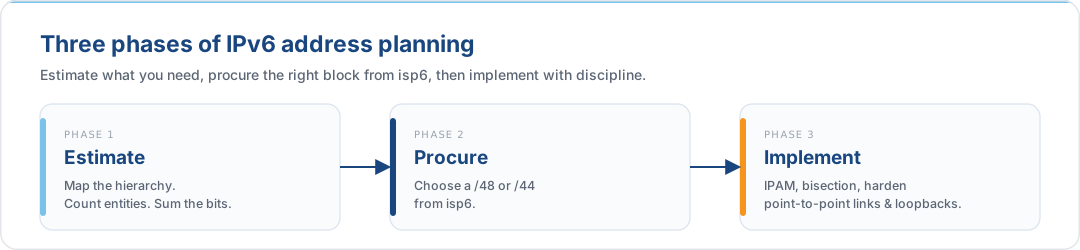
This article is the planning companion to the rest of the knowledge base. The misconceptions guide explains how to think about IPv6 once you are deploying; this one explains how to size and structure what you deploy into. It is written for isp6 members and follows a three-phase arc: estimate, procure, implement.
2. The Mentality Shift: From Scarcity to Routing Optimisation
Address planning in IPv4 is an exercise in conservation. A /24 gives you 254 hosts; a /22 aggregates four /24s; anything larger is expensive and hard to justify. The engineer's instinct is to subnet as tightly as possible, /29 for a six-host segment and /30 for a point-to-point, because every address is a resource you will eventually answer for.
IPv6 inverts that logic. The goal of an IPv6 address plan is not to conserve addresses but to produce a clean routing topology, a readable reverse-DNS tree, and room for future growth without renumbering. The arithmetic is different, and so is the discipline.
| Aspect | IPv4 Mentality | IPv6 Mentality |
|---|---|---|
| Objective | Conserve limited address space | Optimise routing and aggregation |
| Method | Tight VLSM sized to exact host counts | Hierarchical allocation regardless of host counts |
| Tools | Spreadsheet tracking, manual IPAM | Dedicated DDI / IPAM platform |
| Scale constraint | Address exhaustion | Human discipline and nibble alignment |
| Waste tolerance | Low, every address matters | High, the address space is not the constraint |
The headline figure is worth internalising: the IANA has allocated only a small
fraction of the 2000::/3 global unicast range, and within it isp6 alone has access to
enough /48 blocks to assign one to every large enterprise on Earth several times over.
A /48 allocation contains 65,536 /64 subnets; a /44 contains 16 /48 blocks.
These are not figures that will run out.
What does run out, if you let it, is the human discipline that keeps the hierarchy legible. That is the real resource being managed.
3. Address Anatomy and the Nibble
Before the estimation work, a brief refresher on the building block.
An IPv6 address is 128 bits, written as eight groups of four hexadecimal characters separated by colons:
2001:0db8:acad:0001:0000:0000:0000:0001
└────────── 64-bit prefix ──────────┘└─── 64-bit interface ID ───┘
Each hex character represents exactly 4 bits, a nibble. Every meaningful boundary in an IPv6 address plan should fall on a nibble boundary, which means prefix lengths that are multiples of 4:
| Prefix | Block size | Typical role |
|---|---|---|
/32 |
isp6's upstream RIPE NCC allocation | Not customer-facing |
/44 |
16 × /48 | Multi-region or multi-account isp6 allocation |
/48 |
65,536 × /64 | Standard enterprise isp6 allocation |
/52 |
4,096 × /64 | Regional or environment block within a /48 |
/56 |
256 × /64 | Campus, branch office, broadband home user |
/60 |
16 × /64 | Small site, strict minimum end allocation |
/64 |
1 subnet | Every multi-host LAN or VLAN |
There are two legitimate reasons not to align to a nibble:
- /127 on point-to-point inter-router links (RFC 6164), a security-driven exception covered in §8.
- /128 on loopbacks and anycast addresses (RFC 4291).
Everything else, meaning every subnet ID, every aggregation boundary and every firewall summary, should sit on a 4-bit line. The cost of breaking this rule is paid every day in reverse-DNS zone delegation, route aggregation, and the cognitive load of reading a firewall rule that spans two hex characters.
When a Prefix Falls Mid-Nibble
Your own address plan should align to nibble boundaries, but you will encounter non-nibble prefixes in the wild. Transit providers, cloud platforms, and some RIR allocations use prefix lengths like /29, /33, /47, or /93 that slice through the middle of a hexadecimal character. When this happens, you must drop to binary to find the exact network boundary.
When a prefix length is a multiple of 4, the boundary falls cleanly at the end of a hex character, so no binary work is required. A /56, for example, divides the address after the 14th hex character (56 / 4 = 14). You can read the network prefix directly from the hex notation.
When a prefix length is not a multiple of 4, the boundary bisects a single hex character and you must decompose that character into its four binary bits to determine which bits belong to the network and which to the host.
Worked example: finding the network address for …:000b::/93:
The prefix length /93 is not a multiple of 4. To find which hex character the boundary falls inside:
93 ÷ 4 = 23 remainder 1
The boundary falls after 23 complete hex characters, then 1 bit into the 24th. The
24th hex character in this address is b.
| Step | Action | Result |
|---|---|---|
| 1. Isolate the boundary character | The 24th hex character is b |
b |
| 2. Expand to binary | b = decimal 11 = binary 1011 |
1 0 1 1 |
| 3. Draw the prefix boundary | 1 bit belongs to the network (the remainder from step 1) | 1 0 1 1 |
| 4. Zero the host bits | Replace the host-portion bits with zeros | 1 0 0 0 |
| 5. Resynthesize to hex | Binary 1000 = decimal 8 = hex 8 |
8 |
The network address changes from …:000b::/93 to …:0008::/93.
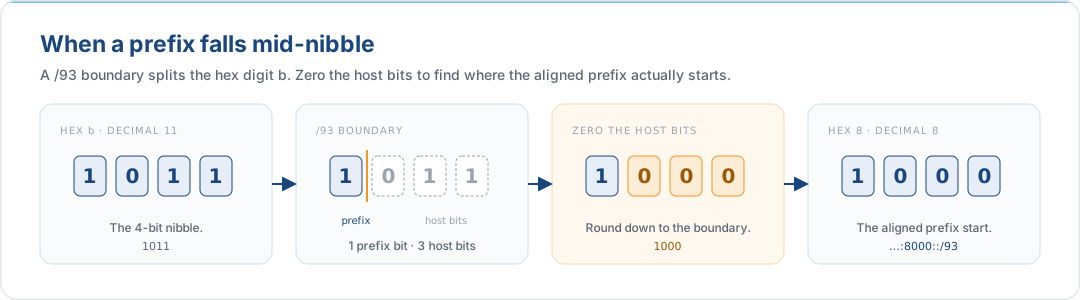
This technique applies whenever you receive a prefix at a non-nibble boundary from an upstream provider or need to verify a route filter for a non-standard prefix length. Inside your own allocation, design on nibble boundaries and you will never need to reach for it, but when you encounter one in the wild, this five-step process resolves it deterministically. For the foundational hex-to-binary conversion table, see The Anatomy of a 128-Bit Address in the introduction guide.
4. Phase 1: Estimate Your Needs
The estimation phase produces a single number: the total number of bits you need below your allocation to reach a /64 at the leaf. That number determines whether a /48 or a /44 from isp6 is the right starting point.
4.1 Map the Hierarchy
Most organisations fit one of three archetypes:
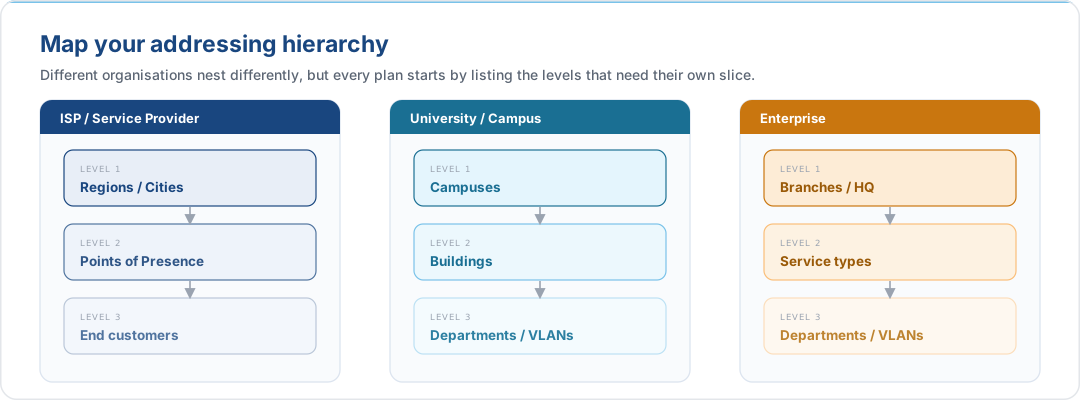
Pick the archetype that matches your organisation and draw the tree. Keep it rough: this is a sizing exercise, not an engineering diagram. For each tier you only need to answer one question: what is the largest entity count I will ever need at this level?
4.2 The Estimation Matrix
To size a tier, round your largest entity count up to the next tier in the bit-to-entity table, and take the corresponding bit count:
| Bits | Entities per tier | Typical application |
|---|---|---|
| 4 | 16 | Regions, AZs, environments |
| 8 | 256 | Branches, campuses, /56 customer blocks |
| 12 | 4,096 | Large broadband populations, departments |
| 16 | 65,536 | Ultra-large customer bases |
| 20 | 1,048,576 | National service provider scale |
Rounding up is the whole trick. If you operate in 10 regions, you reserve 4 bits for the region tier (up to 16). If the largest region has 50 PoPs, you reserve 8 bits for the PoP tier (up to 256). If the largest PoP serves 2,700 customers, you reserve 12 bits for the customer tier (up to 4,096). The bit budgets are based on the largest entity at each level; smaller entities automatically fit.
4.3 Sum the Bits
Add the bit budgets for every tier above /64. The result is the number of bits between your allocation and the per-subnet /64, which tells you whether a /48 or a /44 from isp6 is the right choice:
- /48 gives 16 bits above /64 (
64 − 48 = 16). - /44 gives 20 bits above /64 (
64 − 44 = 20).
A tier budget that sums to 16 bits or fewer fits a /48; 17–20 bits needs a /44. Anything beyond 20 bits is almost always a miscount, so re-examine whether every tier in your hierarchy truly needs its own bit budget, or whether two tiers can be collapsed. A plan that appears to require more than 20 bits is a signal to tighten the hierarchy, not to look beyond isp6's /48 and /44.
4.4 Two Worked Examples
Enterprise with three AWS regions and four business units:
| Tier | Entities | Bits reserved |
|---|---|---|
| Region | 3 (rounded to 16) | 4 |
| Business unit | 4 (rounded to 16) | 4 |
| Environment (prod/stage/dev) | 3 (rounded to 16) | 4 |
| Subnet (/64) | – | 0 |
| Total | 12 bits |
A /48 gives 16 bits above /64. 12 bits are consumed, 4 bits remain for growth. Request a /48 from isp6.
Global enterprise with 12 regions, two clouds, and strict segregation of prod/stage/dev across 30+ accounts:
| Tier | Entities | Bits reserved |
|---|---|---|
| Region | 12 (rounded to 16) | 4 |
| Cloud / account | 32 (rounded to 256) | 8 |
| Environment | 3 (rounded to 16) | 4 |
| Subnet (/64) | – | 0 |
| Total | 16 bits |
16 bits above /64 is exactly a /48 with zero growth headroom. The prudent choice is a /44 (20 bits above /64), which leaves 4 bits, a 16× multiplier, for new regions, clouds, or a restructuring event. Request a /44 from isp6.
5. Phase 2: Choose Your isp6 Allocation
5.1 Portable PA: Your Allocation Moves With You
Your allocation from isp6 is Provider Aggregatable address space, with a crucial difference from the PA that most ISPs offer: it is portable. Traditional PA ties your prefix to a single upstream provider's routing, and announcing it from anywhere else gets the route filtered. isp6-issued PA can be announced from AWS, Azure, Google Cloud, a colocation facility, on-prem, or several of these simultaneously via BYOIP. You own the cryptographic proof-of-ownership key; isp6 handles the inet6num, route6, ROA, and reverse DNS delegation behind the scenes. The prefix moves with you, not with your provider.
The planning question for isp6 customers is therefore not "where do I source address space from?" but simply: how much space do I need?
5.2 /48 or /44?
| Allocation | Capacity | Typical fit |
|---|---|---|
| /48 | 65,536 × /64 subnets | Single-region or dual-region workloads; enterprises with ≤ 4,096 meaningful subnets across all environments |
| /44 | 16 × /48 blocks | Multi-region deployments; multi-account strategies (one /48 per account or region); organisations expecting meaningful growth over the next 5–10 years |
Work through the Phase 1 arithmetic honestly before deciding. A /48 is adequate for most enterprises and leaves room for a realistic hierarchy; a /44 is the right choice whenever the plan has a per-region or per-account tier that itself will hold hundreds of subnets. Upgrading later is possible but not free, and the simpler outcome is to size correctly up front.
5.3 Never Delegate a /64 to a Subnet-Capable Downstream
If you sub-delegate pieces of your isp6 allocation to internal business units, subsidiaries, or downstream customers, follow the same /48 / /56 / /60 / /64 hierarchy that isp6 applies when allocating to you:
| Downstream type | Delegate |
|---|---|
| Large business unit, subsidiary | /48 |
| Branch office, campus, small subsidiary | /56 |
| Strict minimum for a site that will not grow | /60 |
| Single multi-host VLAN | /64 (terminal, cannot subnet further) |
Do not delegate a /64 to anyone who may ever need to create a second subnet. A /64 is a leaf, not a block; it cannot be split while preserving SLAAC. If in doubt, give a /56 (still only 256 /64 subnets, but enough for any realistic small site) and sleep soundly.
6. Phase 3: Implement With IPAM
6.1 Why Spreadsheets Fail
A /48 contains 65,536 /64 subnets. A /44 contains just over a million. The density and cascading hierarchy make manual tracking in a spreadsheet or wiki table mathematically and operationally untenable after the first few months of growth. Common failure modes:
- Collision on delegation: two engineers allocate the same /56 to different teams because the tracking sheet was stale.
- Aggregation drift: ad-hoc assignments drift off nibble boundaries, producing routing tables that no longer summarise.
- Orphaned blocks: subnets allocated but never deployed, undetectable without a reconciliation pass against the live network.
- No source of truth for reverse DNS: the PTR record structure falls out of sync with the allocation table.
The IPv6 discipline is to run a dedicated DDI/IPAM platform (NetBox, BlueCat, EfficientIP, Infoblox, Men&Mice, phpIPAM, or equivalent) from day one. The platform owns the hierarchy; humans query it for the next available block at a given prefix length, and the platform guarantees alignment and uniqueness.
6.2 Avoid the Mapping Trap
Do not encode legacy IPv4 addresses inside the IPv6 host portion to preserve old numbering: the IPv4 octet boundary is 8 bits, IPv6 is designed around 4-bit nibbles, and forcing the former into the latter breaks reverse-DNS delegation and defeats route aggregation. The full treatment, including the impact on firewall rule readability and worked before/after examples, lives in Avoid the Mapping Trap in the misconceptions guide. Read it there once you have your own hierarchy on paper, and design the IPv6 scheme on its own terms.
6.3 Respect the /64 Multi-Host Boundary
Every multi-host LAN or VLAN must be configured as a /64. Stateless Address Autoconfiguration (SLAAC) generates the 64-bit Interface ID from the host's MAC address (EUI-64) or a randomised identifier (Privacy Extensions, RFC 8981) and combines it with the 64-bit prefix advertised by the router. Subnetting past /64 on a multi-host link, for example carving a /80 to "save space", breaks SLAAC, breaks Duplicate Address Detection, and degrades Neighbor Discovery performance.
This rule is worth stating plainly because the temptation to tighten it persists:
Every multi-host link gets a /64. Full stop. The only exceptions are point-to-point inter-router links (/127) and loopbacks (/128).
See Microsegment Your Subnets in the misconceptions guide for the full list of what breaks when you violate the /64 rule.
7. Future-Proofing With the Bisection Method
The order in which you hand out subnets matters. Sequential assignment is the naive default:
Customer A → :1::/56
Customer B → :2::/56
Customer C → :3::/56
Customer D → :4::/56
It works until Customer A asks for more space. Because Customer B now sits immediately adjacent, Customer A cannot grow contiguously and has to accept a discontiguous second block, which fragments the routing table and the reverse-DNS tree.
The bisection method allocates from the middle of the available range instead:
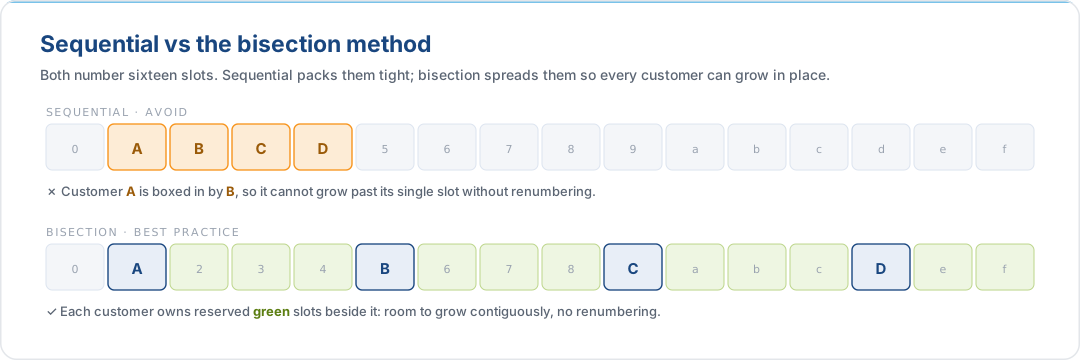
The rule is simple: when making an initial assignment, skip blocks so that any single
customer can double or quadruple in place without colliding with a neighbour. The first
customer gets :1::/56, the second gets :9::/56, the third gets :5::/56, and so on.
Each sits in the middle of a large unused range. When a customer needs more space,
the surrounding blocks are still free.
Reserve the 0th Subnet for Core Infrastructure
Regardless of how you bisect the rest of the space, keep the first block of any
allocation off-limits for customer or workload use. Reserve …:0::/64 (within a /48)
or the first /48 (within a /44) for:
- Router and switch loopbacks (/128s)
- Point-to-point inter-router links (/127s)
- Management and out-of-band networks
- Shared services that every downstream subnet may need to reach
Keeping core infrastructure at a predictable, low-numbered prefix makes monitoring
scopes, route filters, and firewall allow-lists easier to write, and it means the
"interesting" part of the allocation (:1::/64 onwards) matches the bisection scheme
that appears in logs and dashboards.
8. Hardening the Hierarchy
Two implementation details carry disproportionate security weight.
8.1 /127 on Point-to-Point Inter-Router Links
Numbering a point-to-point link as a full /64 exposes roughly 18 quintillion unconfigured addresses on each router interface. An attacker who can send traffic toward the link (directly or via a compromised host elsewhere in your network) can force the router into perpetual Layer 2 resolution by pinging random addresses in the range. Each unresolved destination consumes a neighbour cache entry and triggers an NS flood, and the cache fills faster than entries expire. This is the Neighbor Cache Exhaustion attack class (RFC 6583).
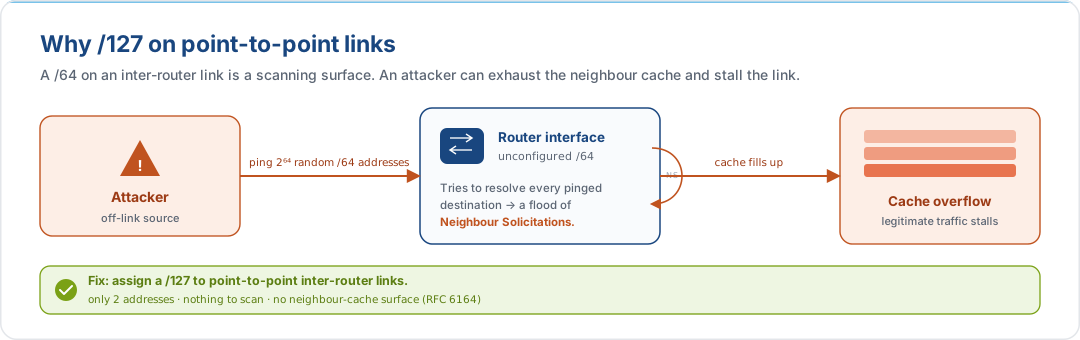
The mitigation is to configure /127 on the interfaces: exactly two addresses, one per end. There is nothing for the attacker to resolve, and the attack surface disappears. Reserve a full /64 for the link in your IPAM (for documentation and aggregation), but configure /127 on the live interfaces:
Reserved in IPAM:  2001:db8:acad:ff00::/64   (link rtr-a ↔ rtr-b)
Configured on rtr-a interface:  2001:db8:acad:ff00::0/127
Configured on rtr-b interface:  2001:db8:acad:ff00::1/127
Use /126 only if a legacy vendor platform does not support /127 correctly.
8.2 /128 on Loopbacks
Each router's loopback interface receives a single /128 address. Loopbacks are the stable identity of the device for BGP peering, management, and monitoring, so they do not need to sit inside a larger prefix, and giving them one would waste an entire /64. Carve loopbacks from a dedicated block inside the 0th subnet reserved in §7.
8.3 A Minimal Core Infrastructure Layout
Inside the reserved 0th subnet, a reasonable template:
| Block | Purpose |
|---|---|
…:0:0::/64 |
Router and switch loopbacks (one /128 per device) |
…:0:1::/64 through …:0:f::/64 |
Point-to-point links (one /127 per link, reserved as /64 in IPAM) |
…:0:10::/60 |
Management and out-of-band networks |
…:0:20::/60 |
Shared services (DNS, NTP, monitoring) |
Every other block (:1::/64 onwards, or :1000::/48 onwards in a /44) is available
for workloads and is allocated using the bisection method.
8.4 One Subnet Per Device Class
Most networks are already split by what the devices are rather than how many there are. Printers on their own VLAN, cameras on another, guest wireless kept away from everything. That split carries over to IPv6 unchanged. What goes away is the argument about how big each one should be.
Give every device class a /60 out of the site's /56. Sixteen /64s per class, sixteen
classes per site, one /64 on each VLAN you actually build. Using 2001:db8:acad::/48
as the allocation and 2001:db8:acad:0100::/56 as the site, with the 0th /56 reserved
for core infrastructure as in §8.3:
| Device class | Block | Live VLAN | Devices | What IPv4 needed |
|---|---|---|---|---|
| Management and OOB | 2001:db8:acad:0100::/60 |
…:0100::/64 |
40 | 10.20.1.0/26 |
| Servers | 2001:db8:acad:0110::/60 |
…:0110::/64 |
300 | 10.20.2.0/23 |
| Workstations | 2001:db8:acad:0120::/60 |
…:0120::/64 |
800 | 10.20.4.0/22 |
| VoIP handsets | 2001:db8:acad:0130::/60 |
…:0130::/64 |
400 | 10.20.8.0/23 |
| Printers and MFDs | 2001:db8:acad:0140::/60 |
…:0140::/64 |
12 | 10.20.10.0/28 |
| IP cameras | 2001:db8:acad:0150::/60 |
…:0150::/64 |
150 | 10.20.11.0/24 |
| Guest wireless | 2001:db8:acad:0160::/60 |
…:0160::/64 |
900 | 10.20.12.0/22 |
| Building management | 2001:db8:acad:0170::/60 |
…:0170::/64 |
60 | 10.20.16.0/26 |
Look down the two right-hand columns. In IPv6 the size never changes. In IPv4 every row is a different size, and each of those sizes was a guess someone made before the estate looked like this.
The sizing decision is gone, not just easier. The printer row makes the point. Twelve printers got fourteen usable addresses, so the fifteenth printer was a change request. Under IPv6 the printers hold the same space as the eight hundred workstations, and nobody had to think about it. You cannot shrink a class to save space either, because subnetting past /64 on a multi-host link breaks SLAAC and Duplicate Address Detection (§6.3). Old habit: do not waste. New habit: do not optimise.
The prefix says what it is. 0140 is printers here and it is printers at every other
site, so a firewall rule reads on its own. 10.20.10.0/28 means nothing without the
spreadsheet, and the spreadsheet is usually out of date.
Rule counts stop growing. One /60 per class is one ACL entry per class, and it stays one entry when the class doubles. The IPv4 version picks up a second range somewhere else in the plan, then a third, and every firewall and route filter grows to match.
Reverse DNS delegates cleanly. ip6.arpa splits on nibble boundaries and a /60 is
exactly fifteen nibbles, so it hands over as a whole zone. in-addr.arpa only splits on
/8, /16 and /24, so that printer /28 needs
RFC 2317 classless delegation. People
set that up once and avoid touching it afterwards.
Growth needs no permission. Splitting cameras per floor later means using
…:0151::/64 and …:0152::/64 from the /60 you already hold. No request, no renumber,
no ACL change.
One limit worth stating plainly: a /56 holds sixteen /60s, so this layout gives you sixteen device classes. If a site genuinely needs more, take the class boundary out of a larger site prefix rather than squeezing classes into /61s. Never renumbering is the point of the plan, and it only holds if you leave the room.
The same arithmetic works in cloud, where the axes are usually tier and availability zone instead of device class. Three tiers across three AZs is nine /64s out of the 256 in a /56, which is why the cloud guides put a /56 on each VPC or VNet rather than the whole allocation.
9. The Architect's Checklist
A one-page summary to review before locking in an allocation plan:
| Principle | Test |
|---|---|
| Design hierarchically | Can I point at each tier of my address plan and name the entity it represents? |
| Respect the nibble | Does every prefix length in my plan fall on a multiple of 4 bits (except /127 on p2p and /128 on loopbacks)? |
| Standardise end allocations | Do all multi-host LANs get /64? Do downstream delegations follow the /48, /56, /60 pattern? Am I avoiding /64 delegations to entities that may need to subnet further? |
| Reserve the 0th subnet | Have I kept …:0::/64 (or the first /48 within a /44) off-limits for anything except core infrastructure? |
| Bisect on assignment | Are initial assignments spread across the allocation rather than packed sequentially? |
| Harden p2p and loopbacks | Are inter-router links configured as /127 in running config even though reserved as /64 in IPAM? Are loopbacks /128 from a dedicated block? |
| Run IPAM, not a spreadsheet | Is there a single source of truth that a machine can query, and is it the only thing that issues a new block? |
| No IPv4 semantics in the hex | Is my addressing scheme designed on IPv6's own terms, not mapped from legacy /24s? |
If every row is a clear yes, the plan will survive contact with growth, audits, and the inevitable re-org.
10. What isp6 Handles vs. What You Plan
Planning a clean hierarchy is the architect's job. Registering and maintaining it at the RIR is isp6's.
| Activity | Owner |
|---|---|
| RIPE NCC LIR membership and compliance | isp6 |
| Drawing the /48 or /44 from isp6's RIPE NCC pool | isp6 |
inet6num and route6 object creation in the RIPE Database |
isp6 |
| RPKI ROA creation and monitoring (via the isp6 subnet dashboard) | isp6 |
| Reverse DNS delegation for the allocation | isp6 |
| Cryptographic proof-of-ownership key generation (browser-side Web Crypto) | isp6 + you (you retain the private key) |
| Phase 1 estimation, counting entities at each tier | You |
| Phase 2 decision, /48 or /44 | You (isp6 allocates whichever you order) |
| Phase 3 IPAM, running the DDI platform, issuing subnets, reconciling | You |
| Bisection discipline during initial assignments | You |
| /127 on p2p, /128 on loopbacks, /64 on every multi-host LAN | You |
| Cloud BYOIP configuration (AWS / Azure / GCP) | You, using isp6 artefacts; see the AWS, Azure, and GCP guides |
The split is deliberate. The parts of the work that need to be done once per allocation and carry compliance obligations (RIR registration, ROA propagation, reverse-DNS delegation) sit with isp6. The parts that are specific to your organisation's structure and that you will revise as it changes (the hierarchy, the IPAM, the BYOIP) stay with you.
11. References
RFCs
| RFC | Title | Relevance |
|---|---|---|
| RFC 4291 | IP Version 6 Addressing Architecture | Defines the /64 interface ID boundary and address format |
| RFC 5375 | IPv6 Unicast Address Assignment Considerations | Planning and assignment strategy guidance |
| RFC 6177 | IPv6 Address Assignment to End Sites | Recommends /48 to /56 for end sites |
| RFC 6164 | Using 127-Bit IPv6 Prefixes on Inter-Router Links | The /127 standard for p2p hardening |
| RFC 6583 | Operational Neighbor Discovery Problems | Neighbor Cache Exhaustion threat model |
| RFC 7421 | Analysis of the 64-bit Boundary in IPv6 Addressing | Authoritative analysis of /64 |
| RFC 8200 | Internet Protocol, Version 6 (IPv6) Specification | Current IPv6 base specification |
| RFC 8981 | Temporary Address Extensions for SLAAC | Privacy Extensions |
RIPE NCC documentation
- RIPE NCC IPv6 Address Allocation and Assignment Policy (ripe-738)
- RIPE NCC IPv6 Address Space Policy
Related isp6 knowledge base articles
- Designing the Next Internet: An Introduction to IPv6: protocol-level primer covering address anatomy, scopes, multicast, and SLAAC; the conceptual foundation this planning guide builds on
- Stop Thinking in IPv4: Misconceptions That Sabotage Your IPv6 Deployment: operational and mental-model complement to this planning guide
- Building an IPv6 Integrated Project Team: the organisational context in which address planning actually gets done
- Bring Your Own IPv6 to AWS
- Bring Your Own IPv6 to Azure
- Bring Your Own IPv6 to Google Cloud
Get the space your plan assumes
A plan needs space to plan with. A /48 from isp6 gives you 65,536 /64s to lay out the way your sites and environments actually work.Get your IPv6 space →
This document is provided for informational purposes. Protocol specifications and cloud provider behaviour are subject to change. Consult the linked RFCs and vendor documentation for authoritative, up-to-date information before making architectural decisions.