Bring Your Own IPv6 to Google Cloud: A Guide for isp6 Members
Audience: isp6 members, cloud architects, and network engineers bringing their isp6-allocated IPv6 PA space to Google Cloud using BYOIP.
Last updated: April 2026
1. Introduction
As an isp6 member, you already own a portable IPv6 allocation: a /48 or /44 block of Provider Aggregatable (PA) address space, registered in the RIPE Database and managed through your isp6 subnet dashboard. This guide walks you through how to bring that allocation to Google Cloud using BYOIP, so you can use your own addresses across your cloud infrastructure while retaining full portability.
isp6 is a Local Internet Registry (LIR) and RIPE NCC member. Your assignment is drawn from isp6's RIPE NCC allocation and is yours to announce from any network, whether Google Cloud, another cloud provider, a colocation facility, or all three simultaneously. Google Cloud's global VPC model makes it a particularly clean fit for BYOIP: a single /48 onboarded once can serve every region you operate in. This guide covers everything you need to make it work.
2. Why Bring Your isp6 Allocation to Google Cloud
2.1 Cost Elimination, Not Just Cost Reduction
Google Cloud charges for every external IPv4 address: in-use static addresses cost approximately $0.004/hour, and idle (reserved but unattached) static addresses cost $0.010/hour. A modest estate of 500 in-use public IPv4 addresses costs roughly $17,520/year before a single byte of data leaves the VPC.
IPv6 changes the equation entirely: Google Cloud does not charge for external IPv6 addresses, whether Google-assigned or BYOIP. Combined with eliminating the need for Cloud NAT (which carries per-hour gateway and per-GB processing fees for IPv4), IPv6 removes two entire line items from your networking bill.
2.2 A Clean Reputation Slate
Your isp6 allocation is a fresh, never-before-used block from isp6's RIPE NCC address pool. There is no prior owner, no inherited blocklist entries, no "noisy neighbour" effect. When you bring this allocation to Google Cloud via BYOIP, you start with a pristine reputation, which is ideal for outbound email, API integrations, and any service where IP reputation affects deliverability or trust scoring.
Note: While your allocation starts clean, you are responsible for maintaining that reputation post-deployment. Misconfigured mail servers or abusive traffic originating from your range will degrade it over time.
2.3 True Portability
Because your allocation is registered through isp6's LIR under RIPE NCC, you can withdraw it from Google Cloud and re-advertise it from another provider, a colocation facility, or a different cloud, all without changing a single allowlist entry or DNS record on the consumer side. Your addresses are never locked to a single cloud provider.
2.4 Address Planning at Scale
A /48 allocation gives you 65,536 /64 subnets, each containing a practically unlimited number of host addresses. A /44 gives you 16 times that. This removes subnet exhaustion as a design constraint and simplifies VPC subnet planning. Because Google Cloud's VPC is global with regional subnets, a single /48 can be cleanly partitioned across every region you operate in.
3. What isp6 Handles vs. What You Do on Google Cloud
One of the advantages of ordering your IPv6 space through isp6's self-service portal is that many of the traditionally complex steps in the BYOIP process are already taken care of. Here is a clear breakdown.
isp6 handles
| Task | Detail |
|---|---|
| PA assignment | Your /48 or /44 is assigned from isp6's RIPE NCC allocation and registered in the RIPE Database |
| inet6num registration | The RIPE DB inet6num object is created automatically when your order is fulfilled |
| RPKI and ROA management | ROAs are created and managed through isp6's RPKI management, including ROAs for cloud provider ASNs needed for BYOIP (see Section 8.2). isp6 monitors ROA propagation status so you can track readiness from your dashboard |
| route6 objects | BGP route objects are created in the RIPE Database as part of your subnet activation |
| Reverse DNS | Configurable through your isp6 subnet dashboard (nameservers and DNSSEC DS records) |
| RSA key pair and RIPE NCC certificate | During onboarding, isp6 generates an RSA 2048-bit key pair in your browser via Web Crypto. The public key is registered on the RIPE NCC inet6num object automatically. You retain the private key for signing cloud provider authorisation messages (see Section 8.3) |
| Ongoing RIPE NCC compliance | isp6 maintains the LIR relationship with RIPE NCC and keeps your registration current |
| Full lifecycle management | isp6 manages the entire RIPE NCC lifecycle, from initial registration through active management to deprovisioning (see Section 4) |
You handle on the Google Cloud side
| Task | Detail |
|---|---|
| Signed authorisation message | Use the private key from your isp6 onboarding to create the signed message Google Cloud requires for PAP provisioning (see Section 8.3) |
| Public Advertised Prefix (PAP) | Create, validate, and announce your PAP, the global BYOIP resource in Google Cloud |
| Public Delegated Prefixes (PDPs) | Create regional PDPs from your PAP and allocate addresses to resources |
| VPC and resource configuration | Configure dual-stack subnets, assign IPv6 addresses to VM NICs, load balancers, and other resources |
Key point: You do not need to apply to RIPE NCC, justify address need, or navigate RIR processes. Your isp6 membership and order give you a registered, RPKI-ready allocation that is ready for BYOIP from day one.
4. How isp6 Manages the Lifecycle of Your Allocation
When you bring your isp6 allocation to Google Cloud, isp6 continues to manage the full RIPE NCC lifecycle in the background. Understanding this lifecycle helps you see where Google Cloud BYOIP fits within the broader picture.
4.1 Lifecycle Overview
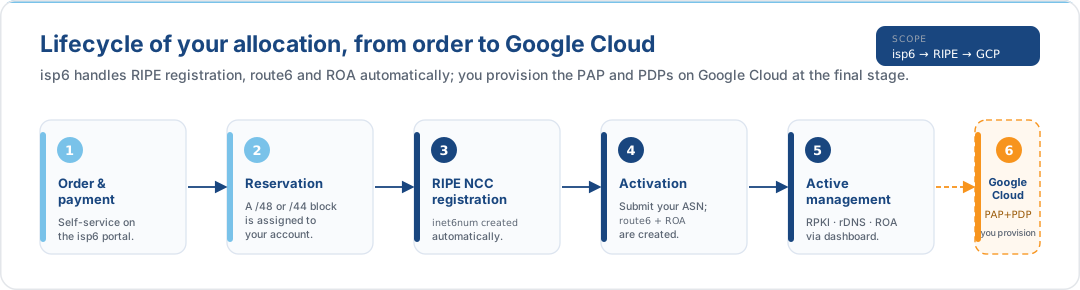
4.2 What Happens at Each Stage
| Stage | Who | What happens |
|---|---|---|
| Order & payment | You (via isp6 portal) | Select /48 or /44, complete identity verification, pay |
| Reservation | isp6 (automatic) | A block from the isp6 pool is reserved and linked to your account |
| RIPE NCC registration | isp6 (automatic) | An inet6num object is created in the RIPE Database for your block |
| Activation | You (via isp6 dashboard) | You submit your origin ASN. isp6 creates the route6 object and publishes a ROA via RPKI |
| Active management | You + isp6 | You request configuration changes (ASN, maximal length, reverse DNS) through the isp6 dashboard. isp6 executes the RIPE NCC API operations |
| Google Cloud BYOIP | You (on Google Cloud) | You add the Google ASN via the cloud panel in the isp6 dashboard, verify ownership, and provision the PAP and PDPs in Google Cloud |
| Ongoing | isp6 | isp6 maintains RIPE NCC compliance, monitors registration state, and handles membership renewals |
| Deprovisioning | isp6 (if membership expires) | If your membership lapses, isp6 deprovisions the RIPE NCC objects in the correct order (ROA, route6, domain, inet6num) |
4.3 How This Relates to Google Cloud
Your Google Cloud PAP and PDPs operate alongside isp6's RIPE NCC lifecycle management, not instead of it. Specifically:
- ROAs: isp6 manages all ROAs for your allocation. Your network ASN and the Google
ASN (
396982) are both published through isp6's RIPE NCC certification authority. - route6 objects: isp6 manages the RIPE DB
route6for your origin ASN. Google separately updates route registries when you announce your PAP (you do not need to manage RADb entries). - Reverse DNS: configured through your isp6 dashboard. Google Cloud does not manage reverse DNS for BYOIP prefixes; the delegation configured in RIPE NCC via isp6 is authoritative.
- Deprovisioning: if you withdraw from Google Cloud, your isp6 allocation and all RIPE NCC registrations remain intact. If your isp6 membership expires, the RIPE NCC objects are cleaned up by isp6, so you should withdraw your PAP before that happens.
Important: Keep your isp6 membership active for as long as you are using the allocation on Google Cloud. If the membership lapses, isp6 will deprovision the RIPE NCC objects, which will invalidate the ROA and cause Google to stop advertising your prefix.
5. Solution Options: Console vs. gcloud CLI / IaC
Google Cloud offers multiple onboarding paths for BYOIP. Choosing the right one depends on your organisational scale and operational maturity.
| Feature | Cloud Console (GUI) | gcloud CLI / IaC (Programmatic) |
|---|---|---|
| Primary tool | Cloud Console | gcloud compute public-advertised-prefixes / Terraform |
| Verification method | X.509 certificate (RDAP) | X.509 certificate (RDAP) |
| Management | Visual dashboard, point-and-click lifecycle | Scriptable, CI/CD-integrated, repeatable |
| Multi-region | Manual: create regional PDPs one at a time | Automated: deploy all PDPs via Terraform modules |
| Complexity | Lower barrier to entry; manual tracking | Higher initial setup; lower long-term overhead at scale |
| Visibility | Console resource view, Audit Logs | Cloud Asset Inventory, Cloud Monitoring, Organization Policies |
| Prefix hierarchy | PAP (global) → PDP (regional) → Addresses | Same hierarchy, defined as code |
When to choose the Console: You are onboarding a single /48 in one or two regions, your team prefers visual management, and you do not need CI/CD integration.
When CLI / IaC is preferred: You manage multiple projects, operate across many regions, or need reproducible deployments via Terraform.
For full onboarding steps, see Using Bring Your Own IP Addresses.
isp6 /44 allocations and Google Cloud BYOIP: Google Cloud requires a minimum /48 for the Public Advertised Prefix. If you hold a /44 from isp6, you can bring the entire /44 as a single PAP, or bring individual /48 slices, for example, one /48 per Google Cloud project.
6. Cost Implications
6.1 Comparative Cost Model
The table below compares the annualised cost of three addressing strategies. All pricing is indicative, so verify current rates at VPC Network Pricing and Cloud NAT Pricing.
| Cost Component | Google-Assigned IPv4 | BYOIP IPv4 | BYOIP IPv6 (isp6) |
|---|---|---|---|
| External IP charge (256 IPs, in-use static) | ~$8,960/yr | $0 | $0 |
| Cloud NAT gateway + processing ($0.045/GB, 10 TB/mo) | ~$5,780/yr | ~$5,780/yr | $0 |
| Data transfer out (10 TB/mo, Premium Tier) | ~$12,000/yr | ~$12,000/yr | ~$12,000/yr |
| Total (approximate) | ~$26,740/yr | ~$17,780/yr | ~$12,000/yr |
IPv6 egress uses external IPv6 addresses assigned directly to VM NICs, with no Cloud NAT gateway is needed, eliminating both the per-hour gateway charge and the per-GB processing fee.
Caveat: Pricing changes frequently and varies by region and Network Service Tier (Premium vs. Standard). The figures above use Premium Tier pricing and are based on publicly available rates as of early 2026. Always consult the Google Cloud Pricing Calculator and the service-specific pricing pages linked above before making financial decisions.
6.2 What Doesn't Change
- Data transfer out charges are identical regardless of whether you use Google-assigned or BYOIP addresses, and regardless of IP version.
- Inter-region transfer rates remain the same for both IPv4 and IPv6.
- Network Service Tier (Premium or Standard) pricing applies equally to IPv4 and IPv6 traffic.
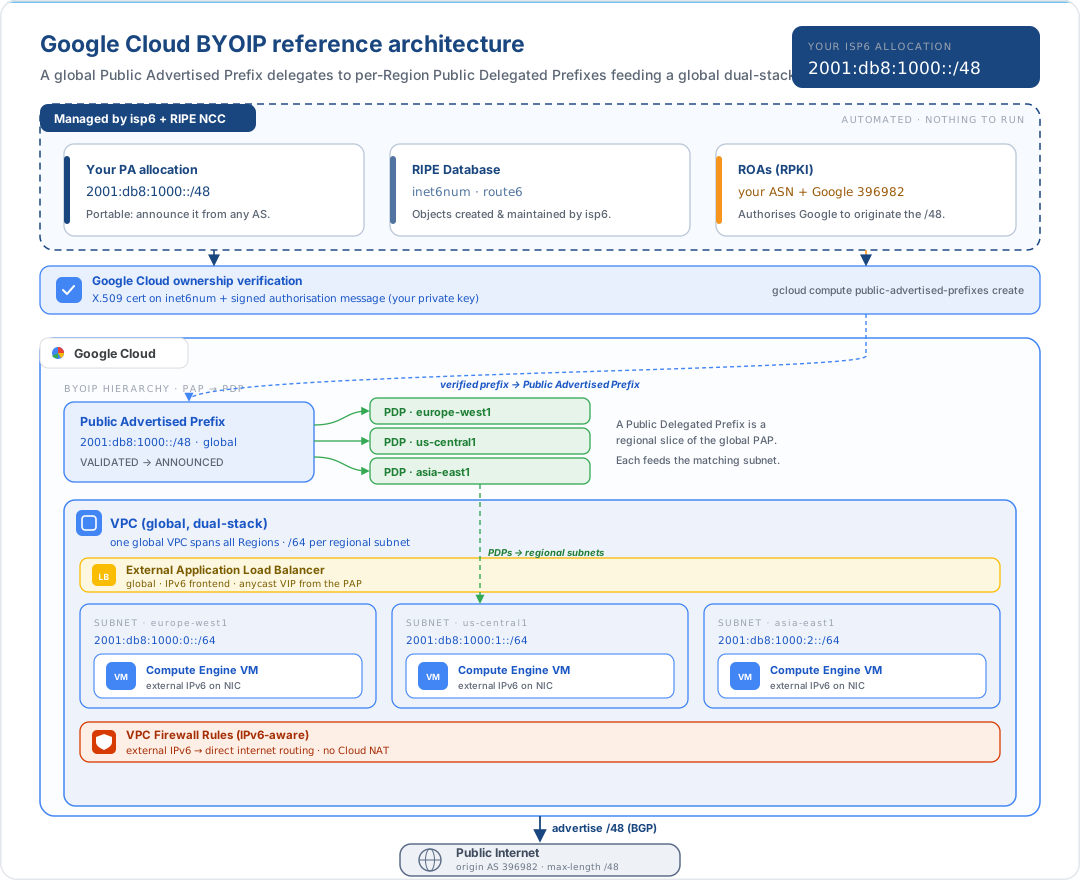
7. Reference Architecture
The following diagram illustrates how your isp6-allocated IPv6 range flows from RIPE NCC through Google Cloud's BYOIP infrastructure to your workloads.
Key Architectural Notes
- Global VPC. Unlike AWS and Azure (where VPCs/VNets are regional), Google Cloud's VPC is a global resource. Subnets are regional. A single VPC can span every region, with your BYOIP IPv6 range partitioned across regional subnets via PDPs.
- No Cloud NAT required. VMs with external IPv6 addresses route directly to and from the internet. Cloud NAT is an IPv4-only construct, so it is not needed (and not used) for IPv6 traffic.
- Dual-stack subnets. Enable IPv6 on each subnet with the
--stack-type=IPV4_IPV6flag and set--ipv6-access-type=EXTERNALto make IPv6 addresses publicly routable. When using BYOIP, the subnet's IPv6 range is drawn from your Public Delegated Prefix. - Global load balancing. Google Cloud's external Application Load Balancer is natively global and supports IPv6 frontends. BYOIP IPv6 addresses can be used as the load balancer's forwarding rule address, providing a deterministic, portable entry point.
- Your isp6 allocation remains portable. Even after onboarding to Google Cloud, you retain full control through your isp6 dashboard. You can withdraw your PAP and re-announce from another provider at any time.
8. Prerequisites for Google Cloud BYOIP
Because your IPv6 space is already allocated and registered through isp6, several of the traditional BYOIP prerequisites are already satisfied. This section covers what is already in place and what you still need to configure for Google Cloud.
8.1 What isp6 Has Already Done
| Requirement | Status | Detail |
|---|---|---|
| RIPE NCC registration | Done | Your allocation is registered under isp6's LIR |
| inet6num object | Done | Created automatically during order fulfilment |
| Minimum /48 prefix | Done | isp6 allocates /48 and /44 blocks, both meeting Google Cloud's minimum |
| Clean address history | Done | Fresh allocation from isp6's pool, never previously used |
| route6 object | Done | Created when you activate your subnet and submit your ASN |
| ROA for your network | Done | Managed via isp6's RPKI management; propagation status visible in your dashboard |
| RSA key pair | Done | Generated during onboarding via Web Crypto. Public key registered on the RIPE NCC inet6num |
8.2 ROA for Google ASN
For Google Cloud to announce your prefix via BGP, you need a ROA that authorises the Google Autonomous System Number. This is managed through isp6's RPKI management, the same mechanism used for your own network's ROA.
| Parameter | Value |
|---|---|
| Origin ASN | 396982 (Google) |
| Prefix | Your /48 (or /44) |
| Maximum length | /48 |
Add the Google ASN using the cloud panel on your isp6 subnet dashboard, then select your cloud provider and the ASN is populated automatically. isp6 manages RPKI for your allocation. The ROA is published through isp6's RIPE NCC certification authority, alongside your existing ROA for your own ASN.
ROA propagation via RPKI can take up to 24 hours. Do not proceed to Google Cloud provisioning until the ROA is visible. Your isp6 subnet dashboard displays ROA propagation status, so you can track readiness without leaving the platform.
Important: If your prefix is currently announced from your own ASN (e.g., from on-premises infrastructure or another cloud provider), ensure your existing ROA remains in place alongside the Google ROA. Removing it prematurely will cause a routing disruption.
8.3 Ownership Verification
Google Cloud requires an X.509 certificate-based verification to prove ownership of the IP range. isp6 has already completed the most complex part of this process during your onboarding.
What isp6 has already done:
During onboarding (step 9, "Configure certificate"), the isp6 portal generates an RSA
2048-bit key pair in your browser using the Web Crypto API. The public key is
automatically registered on the RIPE NCC inet6num descr field for your allocation. You
downloaded the corresponding private key at that time; isp6 never stores it.
What you do for Google Cloud:
Use the private key from your isp6 onboarding to create the signed authorisation message
that Google Cloud requires when creating the Public Advertised Prefix. See
Using Bring Your Own IP Addresses
for the exact message format and openssl signing commands.
Lost your private key? You can regenerate a new key pair at any time from your isp6 dashboard (
/member/certificate). Regenerating invalidates the previous key, and isp6 will update the public key on the RIPE NCCinet6numautomatically.
8.4 Google Cloud Project Requirements
| Requirement | Detail |
|---|---|
| Google Cloud project | Active project with Compute Engine API enabled |
| Permissions | compute.publicAdvertisedPrefixes.create and compute.publicDelegatedPrefixes.create on the target project |
9. Implementation Overview
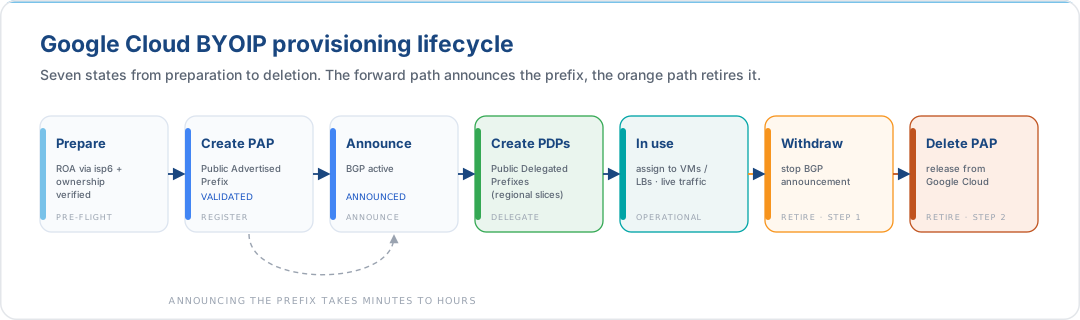
This section outlines the provisioning lifecycle on the Google Cloud side. For exact CLI syntax, signed message construction, and API parameters, refer to the BYOIP documentation.
9.1 Provisioning Lifecycle
9.2 Key Concepts: PAP and PDP
Google Cloud uses a two-tier resource model for BYOIP:
| Resource | Scope | Purpose |
|---|---|---|
| Public Advertised Prefix (PAP) | Global | Represents your /48 or /44. Verified against RDAP and ROA. Once announced, Google's edge routers advertise the prefix via BGP. |
| Public Delegated Prefix (PDP) | Regional | A regional slice of your PAP (from /48 to /64). Created in a specific Google Cloud region. IPv6 addresses are allocated from PDPs and assigned to resources. |
The PAP is onboarded once, then PDPs are created per region, a natural fit for Google Cloud's global VPC with regional subnets.
9.3 Step-by-Step Summary
| Step | Action | Notes |
|---|---|---|
| 1 | Add ROA for Google ASN | Use the cloud panel on your isp6 subnet dashboard to add ASN 396982. isp6 tracks RPKI propagation, so wait until the dashboard confirms the ROA is visible (up to 24 hours). |
| 2 | Create signed authorisation message | Use the private key from your isp6 onboarding to sign the Google Cloud authorisation message. The public key is already on the RIPE NCC inet6num (registered by isp6 during onboarding). |
| 3 | Create Public Advertised Prefix | gcloud compute public-advertised-prefixes create <name> --range=<your/48> --dns-verification-ip=<ip>. Supply the signed authorisation message. |
| 4 | Wait for validation | Google verifies ownership via RDAP and validates the ROA via RPKI. Status transitions to VALIDATED. Monitor with gcloud compute public-advertised-prefixes describe. |
| 5 | Announce the PAP | gcloud compute public-advertised-prefixes update <name> --announce-prefix. Google begins BGP announcements. Status transitions to ANNOUNCED. |
| 6 | Create Public Delegated Prefixes | gcloud compute public-delegated-prefixes create <name> --public-advertised-prefix=<pap-name> --range=<regional-slice> --region=<region>. Repeat for each region. |
| 7 | Allocate addresses and assign | Create external IPv6 addresses from the PDP and assign them to VM NICs, forwarding rules (load balancers), or other resources. |
Do not make manual changes to RADb or other Internet Routing Registries. Google Cloud automatically updates route registries when you announce or withdraw your prefix.
For the complete CLI walkthrough, including signed message construction, see:
10. Monitoring & Security
10.1 Operational Monitoring
| What to Monitor | How | Why |
|---|---|---|
| PAP / PDP status | gcloud compute public-advertised-prefixes describe or Cloud Console |
Detect unexpected state changes (e.g., validation failure, unintended withdrawal) |
| IPv6 address utilisation | Cloud Asset Inventory, custom Cloud Monitoring metrics | Track allocation across projects and regions |
| BGP advertisement health | Google Cloud Service Health, isp6 subnet dashboard | Confirm your prefix remains visible in the global routing table. isp6 monitors ROA propagation status for your allocation |
| IP reputation | Third-party monitoring (e.g., Spamhaus, Google Postmaster Tools) | Catch reputation degradation early. Your isp6 allocation starts clean, but operational issues can change that |
| Audit trail | Cloud Audit Logs (Admin Activity) | Track who created, announced, withdrew, or deleted PAP/PDP resources |
| isp6 subnet dashboard | Your isp6 account | RIPE NCC registration state, ROA validity and propagation status, and event history, giving a single view of your allocation's health alongside your Google Cloud monitoring |
10.2 IAM Least-Privilege Guidance
Restrict BYOIP lifecycle operations to a dedicated infrastructure team. The key Compute Engine permissions to control are:
| Action | Permission | Risk if Unrestricted |
|---|---|---|
| Create a PAP | compute.publicAdvertisedPrefixes.create |
Unauthorised address onboarding |
| Announce (start BGP) | compute.publicAdvertisedPrefixes.update |
Premature or unplanned route announcements |
| Withdraw (stop BGP) | compute.publicAdvertisedPrefixes.update |
Unplanned route withdrawal, causes outage |
| Delete PAP | compute.publicAdvertisedPrefixes.delete |
Permanent removal of the prefix from your project |
| Create PDP | compute.publicDelegatedPrefixes.create |
Unauthorised regional delegation |
| Delete PDP | compute.publicDelegatedPrefixes.delete |
Removal of regional prefix allocation |
| Read (status, metadata) | compute.publicAdvertisedPrefixes.get / .list |
Low risk, grant broadly for visibility |
The built-in Compute Network Admin (roles/compute.networkAdmin) role includes all
of the above. For tighter control, create a
custom IAM role that grants
only the specific permissions needed. Scope role bindings to the project or folder level,
not the organisation level, to limit blast radius.
10.3 Security Considerations
- RPKI is non-negotiable. Your ROA is what prevents another AS from hijacking your prefix via BGP. isp6 manages your RPKI state and monitors ROA propagation status through your subnet dashboard. An expired or invalid ROA means Google will cease advertising your range.
- Do not share the RSA private key used to sign the provisioning message. It is not needed after provisioning; store it securely or destroy it per your key management policy.
- Organization Policies for guardrails. In a multi-project environment, use Organization Policy constraints to prevent non-infrastructure projects from creating PAP or PDP resources.
- VPC Firewall Rules for direct routing. Since external IPv6 addresses are directly reachable from the internet (no Cloud NAT intermediary), ensure VPC firewall rules explicitly deny inbound traffic except for required ports. Use Hierarchical Firewall Policies to enforce organisation-wide baseline rules that individual projects cannot override.
- ROA changes go through isp6. If you need to modify the ROA (e.g., to change the Google ASN configuration or add a new provider's ASN), make the change through your isp6 subnet dashboard to avoid disrupting your BGP advertisements.
11. Rollback & Deprovisioning
If you need to revert, whether to move the range to another provider or to troubleshoot a routing issue, the Google Cloud side is the reverse of provisioning. Your isp6 allocation and RIPE NCC registrations remain intact throughout.
| Step | Action | Effect |
|---|---|---|
| 1 | Remove addresses from resources | Disassociate IPv6 addresses from VM NICs, forwarding rules, and other resources |
| 2 | Delete Public Delegated Prefixes | Remove all regional PDP resources derived from the PAP |
| 3 | Withdraw the PAP | gcloud compute public-advertised-prefixes update <name> --withdraw-prefix makes Google stop BGP announcements. The prefix is no longer globally routable via Google. |
| 4 | Delete the PAP | gcloud compute public-advertised-prefixes delete <name> releases the prefix from your project entirely |
| 5 | Update ROA | Remove ASN 396982 via your isp6 subnet dashboard. Add your new provider's ASN if re-homing. |
| 6 | Clean up certificate (optional) | If you no longer need the public key on the RIPE NCC inet6num, regenerate or remove it from your isp6 dashboard (/member/certificate). |
Your allocation stays yours. Withdrawing from Google Cloud does not affect your isp6 membership, your RIPE NCC registration, or your ability to re-announce the prefix from another provider. This is the core portability benefit of owning your address space through isp6.
Warning: You must delete all PDPs before you can withdraw and delete the PAP. Google Cloud will reject the operation if child resources still exist.
Membership expiry warning: If your isp6 membership lapses, isp6 will deprovision the RIPE NCC objects (ROA, route6, inet6num) following the standard lifecycle. This will invalidate the ROA that Google depends on and cause your prefix to be withdrawn from BGP. Always withdraw your PAP before allowing your membership to expire.
12. Recommendations
-
Start with a /48. The minimum publicly advertisable IPv6 prefix for Google Cloud BYOIP is /48. If you hold a /44 from isp6, decide whether to bring the full /44 or individual /48 slices based on your multi-project strategy.
-
Use the global VPC. Google Cloud's VPC is global. Unlike AWS and Azure, you do not need to create separate network constructs per region. Plan your PDP allocations to map cleanly to your regional subnet layout within a single VPC.
-
Plan your PDP and subnet hierarchy. A /48 gives you 65,536 /64 subnets. Design a consistent allocation scheme before you start assigning, for example a /56 per region and a /64 per subnet within that region. Retrofitting a numbering plan is painful.
-
Monitor RPKI via your isp6 dashboard. Your isp6 subnet dashboard shows RIPE NCC registration state, ROA validity, and propagation status. Complement this with Google Cloud-side monitoring (
gcloud compute public-advertised-prefixes describe) to catch issues early. An expired ROA means Google will stop advertising your prefix. -
Keep the block clean. Your fresh isp6 allocation has never been used. Protect that reputation by deploying proper SPF, DKIM, and DMARC records from day one if you use these addresses for outbound email, and by implementing egress firewall rules to prevent abuse originating from your range.
-
Deploy dual-stack, not IPv6-only (yet). While Google Cloud services increasingly support IPv6, many third-party integrations and SaaS APIs still require IPv4. Run dual-stack with your isp6 BYOIP IPv6 as the primary addressing layer, falling back to IPv4 where necessary.
-
Harden VPC firewall rules for direct routing. Unlike IPv4 where Cloud NAT provides an implicit security boundary, external IPv6 addresses are directly reachable from the internet. Use Hierarchical Firewall Policies to enforce organisation-wide default-deny inbound rules, then allow only the ports your services require at the project or VPC level.
-
Use Premium Network Service Tier. BYOIP prefixes are announced from Google's edge network. Premium Tier routes traffic over Google's private backbone to the closest edge point of presence, giving the best latency and reliability for your BYOIP addresses. See Network Service Tiers for details.
-
Codify with Terraform. Define your PAP, PDPs, subnets, and firewall rules in Terraform using the Google Cloud provider. This ensures reproducibility, audit trails via source control, and safe rollback via redeployment.
13. Further Reading
Google Cloud Documentation
- Bring Your Own IP Addresses: Overview
- Using Bring Your Own IP Addresses
- Configuring Bring Your Own IP
- External IP Address Pricing
- Cloud NAT Overview
- Cloud NAT Pricing
- VPC Overview
- VPC Subnets
- IPv6 Addresses on Compute Engine
- VPC Firewall Rules
- Hierarchical Firewall Policies
- Network Service Tiers
RIPE NCC References
Google Cloud Architecture & Governance
- IAM: Creating Custom Roles
- Organization Policy Overview
- Cloud Audit Logs
- Cloud Asset Inventory
- Google Cloud Terraform Provider
Related isp6 knowledge base articles
- Designing the Next Internet: An Introduction to IPv6: protocol primer for engineers new to IPv6; covers address anatomy, scopes, and SLAAC before you touch the cloud
- Planning Your isp6 Allocation: sizing and structuring your /48 or /44 before you announce it to Google Cloud
- Reference Architectures: Google Cloud: the production topology this guide enables: regional External ALB with PAP / PDP, and multi-region active/active with one global VPC and an anycast frontend
- Stop Thinking in IPv4: Misconceptions That Sabotage Your IPv6 Deployment: IPv4 reflexes to unlearn before configuring VPC firewall rules
- Building an IPv6 Integrated Project Team: cross-functional programme structure for a successful Google Cloud rollout
isp6
One prefix, every Google Cloud region
Google Cloud's VPC is global, so a single /48 from isp6 can cover every region you run in. We handle the registry side. You keep the prefix.Get your IPv6 space →
This document is provided for informational purposes. Protocol specifications and cloud provider behaviour are subject to change. Consult the linked RFCs and vendor documentation for authoritative, up-to-date information before making architectural decisions.