IPv6 in the Wild: A Field Reference
Audience: on-call engineers, SOC analysts, network operators, and FinOps practitioners who need to parse and classify an IPv6 address at speed: from a log line, a firewall rule, a cloud console, or a ticket, without reading the full protocol specification. Assumes basic IPv4 fluency. If you want the ground-up protocol tour, start with Designing the Next Internet: An Introduction to IPv6.
Last updated: April 2026
1. Introduction
Most IPv6 writing is aimed at the engineer designing a network: address planning, scopes, SLAAC, routing. The majority of the time, though, IPv6 reaches an engineer through a very different channel: a log line in an incident, a source address in a firewall denial, a billing row in a cloud console, a row in a ticket queue. The question in that moment is not "how should I design this?" It is "what am I looking at?"
This article is a field reference for that moment. The goal is to move from a raw address like
fe80::1a2b:3cff:fed4:5566
to a confident classification (link-local, stays on this switch, never routed) in under thirty seconds, without reaching for a manual. The three skills you need are decoding a hex character to binary, expanding the compressed notation, and classifying the address by its leading bits. Everything else can wait until you are back at a whiteboard.
If you are entirely new to IPv6, the companion article Designing the Next Internet: An Introduction to IPv6 covers the same ground from first principles and explains why the protocol is shaped this way. This article is the cheat sheet you tab to when the pager goes off.
2. The Four-Bit Decoder
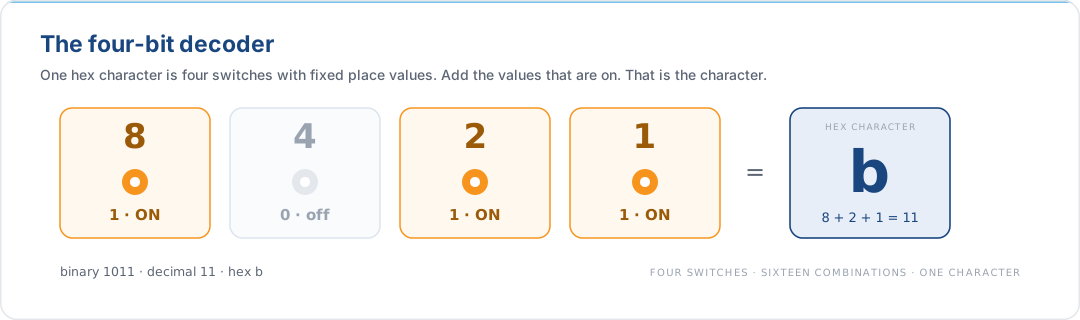
Every hexadecimal character in an IPv6 address is four binary bits. The position values are fixed and double from right to left:
| Position | 4 | 3 | 2 | 1 |
|---|---|---|---|---|
| Place value | 8 | 4 | 2 | 1 |
| Switch state | on/off | on/off | on/off | on/off |
A hex character is the sum of the place values whose switches are on. The binary encoding is the on/off pattern read left-to-right. Four switches, sixteen combinations, one character each. That is the entire mapping:
The useful property: because each hex character occupies exactly four bits, you can
decode a character in isolation without tracking carries across the address. A
firewall rule restricting traffic to fd00::/8 depends only on the first two hex
characters; you can verify compliance by eye.
3. One Hex Character, Four Bits
To decode a hex character into binary, find the largest place value that fits the
target, subtract, and repeat until nothing is left. For D (decimal 13):
| Step | Remaining | Switch | Action | Contribution |
|---|---|---|---|---|
| 1 | 13 | 8 |
on, fits | 8 |
| 2 | 5 | 4 |
on, fits | 4 |
| 3 | 1 | 2 |
off, would exceed | 0 |
| 4 | 1 | 1 |
on, fits | 1 |
Summing: 8 + 4 + 0 + 1 = 13, and reading the switch column top-to-bottom gives
D = 1101. The reverse direction works the same way: given 1011, add the place
values of the on switches (8 + 0 + 2 + 1 = 11) to recover B.
The full table, committed to memory, removes the arithmetic entirely:
| Dec | Hex | Binary | Dec | Hex | Binary | |
|---|---|---|---|---|---|---|
| 0 | 0 |
0000 |
8 | 8 |
1000 |
|
| 1 | 1 |
0001 |
9 | 9 |
1001 |
|
| 2 | 2 |
0010 |
10 | A |
1010 |
|
| 3 | 3 |
0011 |
11 | B |
1011 |
|
| 4 | 4 |
0100 |
12 | C |
1100 |
|
| 5 | 5 |
0101 |
13 | D |
1101 |
|
| 6 | 6 |
0110 |
14 | E |
1110 |
|
| 7 | 7 |
0111 |
15 | F |
1111 |
In practice you rarely need to drop to binary for a whole address. You drop to
binary when a prefix length falls mid-nibble (a /52 or a /60) and you need to
see which bit of which character is a network bit. The
address-planning guide
covers the mid-nibble case in full; for field work, the classification in
§5 is almost always enough.
4. Expanding a Compressed Address
Addresses in the wild are almost always compressed. Two rules apply, and reversing them is deterministic.
Rule 1. Leading zeros within any hextet are dropped. 2001:0db8:0000:0000:0000:0000:0000:0001 becomes 2001:db8:0:0:0:0:0:1.
Rule 2. A single run of all-zero hextets may be replaced with ::. The double
colon appears at most once in any address; two would create an unresolvable
ambiguity about how many zero hextets each one represents. 2001:db8:0:0:0:0:0:1
becomes 2001:db8::1.
To expand a compressed address to its full 128-bit form, three steps:
- Count the visible hextets. The ones you can see.
- Pad each visible hextet to four hex characters. Leading zeros, not trailing.
- Inflate the
::. Insert(8 − visible)zero hextets at the::marker.
Worked example, expanding fe80::1a2b:3cff:fed4:5566:
| Step | Detail | Result |
|---|---|---|
| 1. Visible hextets | fe80, 1a2b, 3cff, fed4, 5566 |
5 visible |
| 2. Pad leading zeros | Each hextet already four characters | none needed |
3. Inflate :: |
8 − 5 = 3 zero hextets at :: |
fe80:0000:0000:0000:1a2b:3cff:fed4:5566 |
The process is deterministic because :: is unique. An address with only a ::, such as
::1, :: or fe80::, collapses or expands the same way.
5. Compression Drills
The compression rules are short and the failure modes are predictable. The
five drills below cover every form of edge case that turns up in production
addresses: leading zeros, the longest-run rule, the ambiguous double ::,
and the URL-bracket convention. Each one is followed by the canonical
RFC 5952 form. Work through
them once and the patterns will be recognisable on sight thereafter.
5.1 Drill 1: Eliminating Leading Zeros and a Long Run
Address: 2001:0db8:0000:0000:0000:0000:0000:0c50
The whole middle of the address is zero hextets. Step through both rules:
| Step | Rule | Result |
|---|---|---|
| 1 | Drop leading zeros within each hextet | 2001:db8:0:0:0:0:0:c50 |
| 2 | Replace the single longest zero run with :: |
2001:db8::c50 |
Three forms are mathematically equivalent and accepted by every parser:
2001:0db8:0:0:0:0:0:0c50, 2001:0db8::0c50, and 2001:db8::c50. RFC 5952
mandates the last, because it is fully compressed and lower-case, which is the form
to write into runbooks, firewall rules, and router configuration.
The trap: 2001:db8::c5 is not the same address. Trailing zeros inside a
hextet cannot be dropped, only leading ones, so 0c50 collapses to c50
and never to c5.
5.2 Drill 2: The Longest-Run Rule
Address: 2001:0db8:0000:0000:b450:0000:0000:00b4
This address has two runs of zero hextets, both of length two. Only one of
them can be replaced with ::, because using :: twice would create the
unresolvable ambiguity covered in
§4 of the introduction.
Two equally valid compressions exist, and both will be accepted:
| Compression target | Result |
|---|---|
| Compress the leftmost run | 2001:db8::b450:0:0:b4 |
| Compress the rightmost run | 2001:db8:0:0:b450::b4 |
RFC 5952 §4.2.3
breaks the tie: when runs are equal in length, compress the leftmost. The
canonical form is therefore 2001:db8::b450:0:0:b4.
The form 2001:db8::b450::b4, applying :: twice, is invalid. Any
parser that accepts it is broken; the runtime cannot know which :: covers
how many hextets.
5.3 Drill 3: Mid-Address Single Zero Hextets
Address: 2001:0db8:00f0:0000:0000:03d0:0000:00ff
Here the longest run of zeros is the pair in the middle (0000:0000). The
single 0000 near the end is shorter and must not be replaced with ::
because that would put two :: markers in the same address.
| Stage | Detail | Result |
|---|---|---|
| 1. Strip leading zeros | Drop leading zeros in every hextet | 2001:db8:f0:0:0:3d0:0:ff |
| 2. Identify the longest run | Two consecutive zero hextets in the middle | 2001:db8:f0 :: 3d0:0:ff |
3. Apply :: once |
Replace the longest run only | 2001:db8:f0::3d0:0:ff |
Note that an address such as 2001:db8:0f0:0:0:3d0:0:0ff (where leading
zeros are kept in some hextets and not in others) is parseable but
non-canonical; RFC 5952 requires consistent removal.
5.4 Drill 4: When :: Cannot Be Used At All
Address: 2001:0db8:0f3c:00d7:7dab:03d0:0000:00ff
There is exactly one zero hextet, and it is sandwiched between non-zero
hextets. The :: shortcut requires a run of zero hextets, and a single
zero hextet does not qualify under RFC 5952 §4.2.2.
Compressing it as :: would save one character at the cost of legibility,
and the RFC explicitly forbids it.
The canonical form is therefore:
2001:db8:f3c:d7:7dab:3d0:0:ff
Leading zeros are removed from every hextet; the lone 0000 is written 0
and not ::.
5.5 Drill 5: IPv6 in URLs
Web server: 2001:db8::8080 listening on TCP port 8080.
A naive URL such as https://2001:db8::8080:8080 is unparseable: the colon
between the address and the port collides with the colons inside the address,
and the parser cannot tell where the address ends. RFC 3986
requires that an IPv6 literal in a URL be wrapped in square brackets:
https://[2001:db8::8080]:8080
The brackets are part of the URL syntax, not the address itself; they exist
only to disambiguate the port separator. The same convention applies in
ssh user@[2001:db8::1], mongodb://[2001:db8::1]:27017, and most other
URI-like forms.
The address inside the brackets follows the normal RFC 5952 rules, fully compressed and lower-case, so the canonical form of the URL above is exactly the one shown.
6. The Prefix-Spotting Matrix
The single most useful table in IPv6 operations. Read the first one or two hex characters of an address and the category is fixed:
| Address Type | Starts With | Prefix | Primary Function |
|---|---|---|---|
| Global Unicast | 2 or 3 |
2000::/3 |
Public Internet routing. This is an isp6 allocation when you hold one. |
| Anycast | 2 or 3 |
2000::/3 |
Indistinguishable from Global Unicast by bits alone. Assigned to multiple devices; the network routes to the nearest. |
| Unique Local | fc or fd |
fc00::/7 |
Intra-organisation only. Not routed on the public Internet. |
| Link-Local | fe8, fe9, fea, feb |
fe80::/10 |
Same-link only. Required on every active interface. Used by Neighbor Discovery and SLAAC. |
| Multicast | ff |
ff00::/8 |
One-to-group delivery. Replaces IPv4 broadcast. |
| Unspecified | none | ::/128 |
No address yet, used as source during DAD. |
| Loopback | none | ::1/128 |
Local machine only. Replaces 127.0.0.1. |
Two sharp edges worth internalising:
- Anycast has no distinguishing prefix. You cannot tell from the address alone that it is anycast; you need routing context.
- ULA is not a private Global Unicast. It is its own scope, and on a dual-stack
host RFC 6724 deprioritises it
below IPv4. Seeing
fc00::/7in a destination address is a useful signal that the traffic was never supposed to leave the organisation.
The legacy Site-Local scope (fec0::/10) was deprecated by
RFC 3879 and should not appear on a
modern network. If you see it, the device is either very old or misconfigured.
7. Three Walk-Throughs
7.1 fe80::1a2b:3cff:fed4:5566
- Starts with
fe8→ Link-Local (fe80::/10). - Interpretation. Traffic on the local link only. A router will not forward it.
The
ff:fein the middle of the Interface ID is the EUI-64 signature, and this address was auto-generated from a MAC rather than assigned by Privacy Extensions. - Action in an incident. If this shows up as a source in an external firewall log, something is wrong with the device or the logging pipeline. Link-Local traffic cannot cross a router.
7.2 2001:db8:a1b2:c3d4::42
- Starts with
2→ Global Unicast (2000::/3). - Expand. Five visible hextets → three zero hextets at
::→2001:0db8:a1b2:c3d4:0000:0000:0000:0042. - The
/64split. Network prefix2001:db8:a1b2:c3d4::/64, Interface ID::42. - Interpretation. Publicly routable. Global Unicast is the address type isp6 provisions for its members: a /48 or /44 drawn from isp6's RIPE NCC pool, registered in the RIPE Database, and portable across any network you announce it from.
- A caveat on this specific block.
2001:db8::/32is the RFC 3849 documentation prefix. Seeing it in a production log means either documentation has leaked into runtime or someone is running deliberate test traffic, and it is never a real customer.
7.3 ff02::1:ff00:42
- Starts with
ff→ Multicast (ff00::/8). - The second character,
02: is the multicast scope: link-local. - The
ffnibble inside the address is the Solicited-Node multicast signature:ff02::1:ffXX:XXXX, where the last 24 bits come from the target unicast address. - Interpretation. A host is performing Neighbor Discovery or Duplicate Address
Detection for a target whose low-order 24 bits are
00:00:42. This is SLAAC working as designed. See §9 of the introduction for the full bootstrap.
8. Further Reading
- Protocol fundamentals. Designing the Next Internet: An Introduction to IPv6: the ground-up tour of address anatomy, scopes, SLAAC, Neighbor Discovery, and minimal router configuration.
- Designing an allocation. Planning Your isp6 Allocation: the estimate / procure / implement arc, the nibble discipline, bisection, and hardening point-to-point links and loopbacks.
- IPv4 reflexes that break IPv6. Stop Thinking in IPv4: Misconceptions That Sabotage Your IPv6 Deployment: the six habits to unlearn, including the ICMPv6 allow-list you will need before any SLAAC traffic flows.
- Bringing your isp6 allocation to a cloud. AWS · Azure · Google Cloud.
9. References
| RFC | Title | Relevance |
|---|---|---|
| RFC 4291 | IP Version 6 Addressing Architecture | Address format, prefixes, scopes |
| RFC 5952 | A Recommendation for IPv6 Address Text Representation | Canonical compression rules used by every parser |
| RFC 4193 | Unique Local IPv6 Unicast Addresses | Defines fc00::/7 |
| RFC 3879 | Deprecating Site Local Addresses | Why fec0::/10 should not appear on a modern network |
| RFC 3849 | IPv6 Address Prefix Reserved for Documentation | 2001:db8::/32 |
| RFC 6724 | Default Address Selection for IPv6 | Why ULA is deprioritised below IPv4 on dual-stack hosts |
| RFC 4861 | Neighbor Discovery for IPv6 | Solicited-Node multicast and the ff02::1:ffXX:XXXX pattern |
From reference to running
Keep this page for reference. When you want real addresses to work against, isp6 issues a /48 registered to you, self-service.Get your IPv6 space →
This document is provided for informational purposes. Protocol specifications and cloud provider behaviour are subject to change. Consult the linked RFCs and vendor documentation for authoritative, up-to-date information before making architectural decisions.