description: An introduction to IPv6 for engineers and architects with deep IPv4 experience: addressing, ICMPv6, neighbour discovery, and a clean mental model for IPv6.
Designing the Next Internet: An Introduction to IPv6
Audience: engineers, architects, and technical leaders who have worked with IPv4 for years and now need a clean mental model for IPv6, whether because a cloud migration, a greenfield build, or an isp6 allocation is pushing the protocol onto the roadmap. No prior IPv6 knowledge is assumed.
Last updated: April 2026
1. Introduction
Every technical deployment guide in this knowledge base, whether planning a /48, bringing your allocation to AWS, correcting or correcting the IPv4 reflexes that sabotage a new network, assumes you already know how an IPv6 address is built, how it is assigned, and how a host on a fresh subnet discovers its router without a DHCP server in sight. For engineers coming from a pure IPv4 background, that assumption is a leap.
This article fills the gap. It is the starting point for the rest of the knowledge base: a ground-up tour of IPv6 as a protocol, written for the engineer who can recite the IPv4 RFCs in their sleep but has never read a Router Advertisement packet. The goal is to build a mental model that makes the other articles, from the misconceptions guide, the address-planning guide, and the cloud BYOIP guides for AWS, Azure, and Google Cloud, read as natural continuations rather than standalone specialist material.
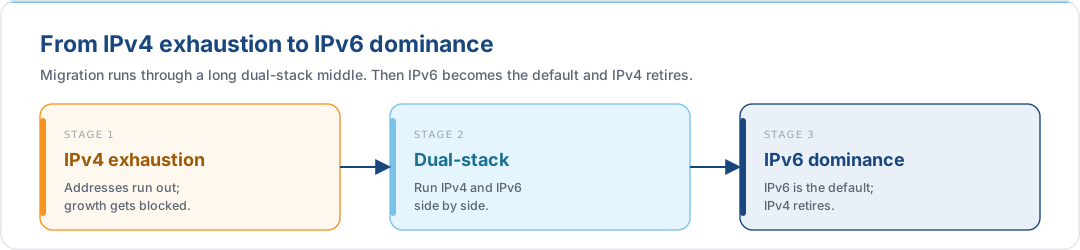
The transition is already well underway. IPv4 exhaustion at the RIRs forced operators into dual-stack running; dual-stack is itself an interim state on the road to IPv6 dominance. The protocol is no longer a research curiosity or a roadmap item. It is the network you will be operating for the rest of your career.
2. Why IPv6 Exists: From Scarcity to Abundance
2.1 The Constraint That Built IPv4
IPv4 addresses are 32 bits long. That yields roughly 4.3 billion unique addresses, a figure that seemed generous in 1981, when the population of connected machines was measured in the low thousands, and indefensible by the mid-1990s, when it became clear that "every person, every car, every sensor" was the long-term scale. The entire edifice of IPv4 workarounds (CIDR, NAT, CGNAT, VLSM, RFC 1918 private space, address-exhaustion auctions) is an attempt to stretch 32 bits across a world that needs many more.
2.2 The Expansion
IPv6 addresses are 128 bits long. The arithmetic is not "four times bigger." It is 2^96 times bigger. The expansion factor is itself larger than the original IPv4 space. The resulting pool, 2^128 addresses, is large enough to assign a unique public address to every grain of sand on Earth, every star in the observable universe, and every atom on the surface of the planet, with room to spare.
| Aspect | IPv4 | IPv6 |
|---|---|---|
| Address length | 32 bits (4 bytes) | 128 bits (16 bytes) |
| Total addresses | 4.3 × 10^9 | 3.4 × 10^38 |
| Written as | Four dotted decimal octets (192.0.2.1) |
Eight colon-separated hextets (2001:db8::1) |
| Scarcity model | Yes, conservation is the design driver | No, routing clarity is the design driver |
2.3 Benefits Beyond Address Count
Expanding the address space was the headline change, but the IETF used the redesign to fix several long-standing problems with IPv4:
- Simplified header format: the fixed 40-byte IPv6 header has fewer fields than the variable-length IPv4 header, making line-rate routing cheaper in silicon.
- Built-in security: IPsec was originally mandatory in IPv6 and remains a native extension-header feature rather than a bolt-on. The misconceptions guide covers this in detail.
- Enhanced mobility: Mobile IPv6 (RFC 6275) is a first-class feature.
- More efficient routing: hierarchical global allocation allows aggregation that IPv4's fragmented legacy blocks make impossible.
- No broadcast: IPv6 replaces broadcast with targeted multicast and anycast, which massively reduces background noise on a busy link. See §7.
2.4 The Mentality Shift
Most IPv4 muscle memory is counter-productive in IPv6. Conserving addresses, blocking all ICMP, NAT as a security feature, scanning the subnet to find hosts: these were rational responses to IPv4's constraints and actively harmful in IPv6. Before deploying anything, read Stop Thinking in IPv4: it catalogues the six most common reflexes and explains what to do instead.
3. The Anatomy of a 128-Bit Address
A raw 128-bit binary string is unreadable by humans:
11110000000011011100101011111110000000000000000000000000…0001
IPv6 solves this with hexadecimal (base 16) notation. If you have spent your career in dotted-decimal IPv4, hex may not be second nature yet, so here is the complete translation table. There are only sixteen values to learn:
| Decimal | Binary | Hexadecimal |
|---|---|---|
| 0 | 0000 |
0 |
| 1 | 0001 |
1 |
| 2 | 0010 |
2 |
| 3 | 0011 |
3 |
| 4 | 0100 |
4 |
| 5 | 0101 |
5 |
| 6 | 0110 |
6 |
| 7 | 0111 |
7 |
| 8 | 1000 |
8 |
| 9 | 1001 |
9 |
| 10 | 1010 |
a |
| 11 | 1011 |
b |
| 12 | 1100 |
c |
| 13 | 1101 |
d |
| 14 | 1110 |
c |
| 15 | 1111 |
f |
The crucial relationship: exactly four binary bits map to one hexadecimal digit.
The maximum four-bit value 1111 equals f (decimal 15), so there is no single hex
character beyond f. This 4:1 mapping is the reason IPv6 addressing works the way it
does: every hex character in an address represents exactly one nibble of the underlying
binary, and every nibble boundary falls cleanly on a hex character boundary. This
relationship will matter again when we reach prefix extraction and subnet boundaries in
the address-planning guide.
3.1 The Four-Bit Decoder
A useful mental model for decoding a hex character on the fly is four binary switches, each with a fixed place value that doubles from right to left:
| Position | 4 | 3 | 2 | 1 |
|---|---|---|---|---|
| Place value | 8 | 4 | 2 | 1 |
| Switch state | on/off | on/off | on/off | on/off |
Any hex character is the sum of the place values whose switches are on. The binary
encoding is simply the on/off pattern read left-to-right. To decode D (decimal 13),
find the largest place value that fits, subtract, and repeat:
| Step | Remaining | Switch | Action | Contribution |
|---|---|---|---|---|
| 1 | 13 | 8 |
on, fits | 8 |
| 2 | 5 | 4 |
on, fits | 4 |
| 3 | 1 | 2 |
off, would exceed | 0 |
| 4 | 1 | 1 |
on, fits | 1 |
Summing: 8 + 4 + 0 + 1 = 13. Reading the switch states left-to-right yields
d = 1101. The same procedure reverses: given 1011, add the place values of the on
switches (8 + 0 + 2 + 1 = 11) to recover b. Every hex character in every IPv6
address you will ever read decomposes this way, and the 4:1 mapping means you never
have to track a carry across characters.
With that foundation, the address format follows naturally. The 128 bits are grouped into eight 16-bit blocks called hextets, each written as four hexadecimal characters. Hextets are separated by colons:
f00d : cafe : 0000 : 0000 : 0000 : 0000 : 0000 : 0001
└───┘   └───┘   └───┘   └───┘   └───┘   └───┘   └───┘   └───┘
 16b     16b     16b     16b     16b     16b     16b     16b     = 128 bits
Each hexadecimal character represents exactly four bits, a nibble, so every hextet is four nibbles, and the address is 32 nibbles long. This matters more than it might first appear: the nibble boundary is the natural unit of IPv6 addressing. Every well-designed prefix length, subnet ID, and aggregation boundary should fall on a multiple of four bits. See the address-planning guide for the detailed treatment of nibble alignment.
4. Compressing the Notation
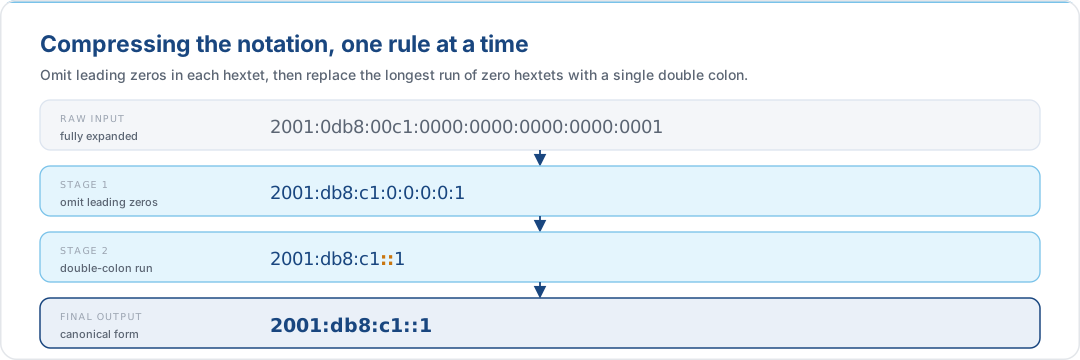
Writing 32 hexadecimal characters and seven colons by hand is tedious, and many IPv6 addresses contain long runs of zeros. Two compression rules, applied in order, reduce the typical address to something tractable.
4.1 Rule 1: Omit Leading Zeros in Each Hextet
Within any hextet, leading zeros can be dropped, but trailing zeros cannot, since removing them would change the value of the hextet.
Raw:        2001:0db8:00c1:0000:0000:0000:0000:0001
Rule 1:     2001:db8:c1:0:0:0:0:1
4.2 Rule 2: The Double Colon
A single unbroken run of all-zero hextets can be replaced with ::. This shortcut may
only appear once in any address, because using it twice would make decompression
ambiguous.
Rule 1 result:   2001:db8:c1:0:0:0:0:1
Rule 2 result:   2001:db8:c1::1
To see why the once-only rule is load-bearing, consider an address with two separate
runs of zeros, as in 2001:0db8:0000:0000:0001:0000:0000:0000. An engineer might be
tempted to compress both runs:
Incorrect: 2001:db8::1::
The router sees three visible hextets and two :: markers but cannot determine how
many zero hextets each :: represents. Two equally plausible expansions produce two
completely different addresses:
| Interpretation | Left :: expands to |
Right :: expands to |
Full address |
|---|---|---|---|
| A | 2 zero hextets | 3 zero hextets | 2001:0db8:0000:0000:0001:0000:0000:0000 |
| B | 3 zero hextets | 2 zero hextets | 2001:0db8:0000:0000:0000:0001:0000:0000 |
The router cannot resolve this. It is a mathematically unsolvable ambiguity. The rule
is therefore absolute: :: appears once or not at all. When an address contains
multiple runs of consecutive zero hextets, compress only the longest run; if the
runs are equal in length, compress the leftmost
(RFC 5952 §4.2.3):
Correct: 2001:db8:0:0:1:: (longest run, 3 trailing zeros, compressed)
4.3 Reading a Compressed Address
To expand a compressed address, count the visible hextets, subtract from eight, and
insert that many zero hextets at the :: marker.
Reversing the process is just as systematic. Given a compressed address, three steps recover the full 128-bit form:
Worked example: expanding 2001:db8:1::5:
| Step | Action | Result |
|---|---|---|
| 1. Identify visible hextets | Count the hextets you can see: 2001, db8, 1, 5 |
4 visible |
| 2. Pad leading zeros | Restore every hextet to four characters | 2001:0db8:0001::0005 |
3. Inflate the :: marker |
8 required − 4 visible = 4 zero hextets to insert at :: |
2001:0db8:0001:0000:0000:0000:0000:0005 |
The process is deterministic: because :: can only appear once, there is exactly one
correct expansion for any compressed address.
Compression is purely cosmetic; the wire format is always the full 128 bits. But consistent, correct compression makes configuration files, firewall rules, and logs dramatically easier to read.
5. Slicing the Address: Network Prefix vs. Interface ID
IPv6 discards the variable subnet-mask notation that dominated IPv4. Every address is split on a fixed conceptual boundary: the first 64 bits are the Network Prefix, the last 64 bits are the Interface ID.
| ← 128 bits → | ||||
|---|---|---|---|---|
| Network Prefix (64 bits) | Interface ID (64 bits) | |||
| IANA /3 |
RIR /23 |
Site /48 |
Sub /64 |
Unique host ID |
5.1 The Network Prefix
The prefix is itself hierarchical. Each tier is assigned by a body further upstream:
| Range | Length | Assigned by |
|---|---|---|
IANA global pool (2000::/3) |
3 bits | IANA |
| Regional Registry (e.g., RIPE NCC) | up to /23 |
IANA → RIR |
| Site / end user prefix | typically /48 or /44 |
isp6 (via RIPE NCC) |
| Subnet ID | 16 bits within a /48 |
You, inside your allocation |
For an isp6 member, the first three rows are handled for you. You receive a /48 or /44
already registered in the RIPE Database, with inet6num, route6, ROA, and reverse
DNS delegation in place. Your design work begins at the subnet ID.
5.2 The Interface ID
The last 64 bits identify the specific host on the link. Whether it is auto-generated via SLAAC (§9), randomised for privacy (RFC 8981), or statically assigned, it lives inside a fixed 64-bit space.
5.3 Why /64 Is Load-Bearing
A single /64 subnet contains 2^64 addresses, more than the entire IPv4 internet.
Engineers arriving from IPv4 routinely ask whether they can "save space" by assigning
/80 or /96 subnets to small segments. The answer is no:
- SLAAC expects 64 bits of Interface ID.
- Privacy Extensions (RFC 8981) rotate 64-bit identifiers.
- EUI-64 maps a 48-bit MAC into a 64-bit Interface ID.
- Neighbor Discovery and DAD are optimised around
/64.
Every multi-host link is a /64. The only deviations are /127 on point-to-point
inter-router links and /128 on loopbacks, covered in detail in
Hardening the Hierarchy.
6. Address Scopes: Where an Address Is Valid
In IPv4, private (10.0.0.0/8, 192.168.0.0/16, 172.16.0.0/12) and public addresses
coexist but are distinguished only by convention and routing policy. IPv6 formalises
scope as a first-class property of the address.
| Scope | Prefix | Routability | Primary Use |
|---|---|---|---|
| Global Unicast | 2000::/3 |
The public Internet | Publicly reachable addresses. This is your isp6 allocation. |
| Unique Local (ULA) | fc00::/7 (or fd00::/8) |
Internal organisation, never routed to the public Internet | Private internal addressing, largely unnecessary given IPv6's abundance |
| Link-Local | fe80::/10 |
Strictly the local link; never routed | Device-to-device communication on the same switch or VLAN; required on every active interface |
Link-Local is the quietly revolutionary scope. Every IPv6 interface is required to have one. It is used for Neighbor Discovery, Router Solicitations and Advertisements, and any traffic that must stay on the local link regardless of routing state. You cannot "turn off" IPv6 on a link and still expect it to work correctly; Link-Local is the substrate that other scopes depend on.
Unique Local is a trap for engineers who read fc00::/7 as "the new RFC 1918". It has
a subtle address-selection problem that silently deprioritises it below IPv4 on
dual-stack hosts. See
Misconception 4: ULA Is the New RFC 1918
before adopting it anywhere.
7. The Death of the Broadcast: Unicast, Multicast, Anycast
IPv4 supports three traffic classes: unicast (one-to-one), broadcast (one-to-all), and multicast (one-to-group). IPv6 eliminates broadcast entirely and adds anycast (one-to-nearest).
7.1 Unicast
Ordinary one-to-one communication between specific endpoints. This is the overwhelming majority of traffic on any network.
7.2 Multicast
A multicast address identifies a group of interested listeners. A packet sent to
ff02::1 reaches every IPv6 node on the local link; a packet to ff02::2 reaches every
router. All IPv6 multicast addresses start with ff. The scope (link, site, global) is
encoded in the next nibble.
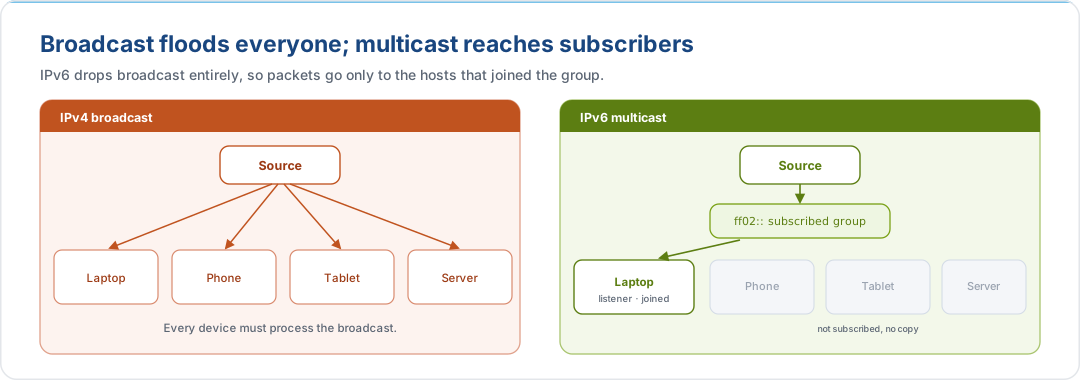
The shift from broadcast to multicast dramatically reduces CPU overhead on uninterested
devices, which never see the frame. Neighbor Solicitation in particular uses a
solicited-node multicast address (ff02::1:ffXX:XXXX) that isolates address
resolution to the single host whose lower 24 bits of address match, so a switch only
forwards the frame to one port instead of flooding.
7.3 Anycast
Anycast addresses are syntactically identical to unicast but assigned to multiple devices. The network routes traffic to whichever instance is closest by routing metric.
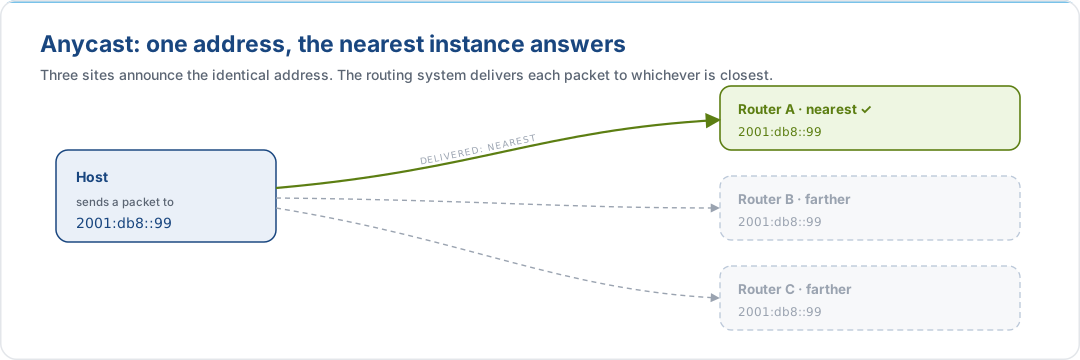
Anycast is how root DNS, CDNs, and large anycast services work at internet scale, but it
has a useful shorthand for the local network too: the all-zeroes Interface ID within a
subnet (e.g., 2001:db8:1:1::/64) acts as a Subnet-Router anycast address for every
router on that subnet.
8. A Portfolio of Addresses per Interface
In IPv4, an interface typically has one address. In IPv6, an interface carries a portfolio of addresses simultaneously, one for every scope it participates in:
| Scope | Example | Used When |
|---|---|---|
| Loopback | ::1 |
Local-machine testing; replaces 127.0.0.1 |
| Link-Local | fe80::1a2b:... |
Talking to anything else on the same switch; required on every active interface |
| Unique Local | fd00::5555:... |
Intra-organisation traffic that should never leave the network |
| Global Unicast | 2001:db8::8888:... |
Public internet |
The golden rule: the operating system automatically selects the smallest scope that reaches the destination. If you are printing to a printer on the same VLAN, traffic leaves as Link-Local and never touches a router. Sending a packet to a host in the same data centre uses Unique Local or a site-scoped Global Unicast. Reaching a public SaaS endpoint uses Global Unicast.
This scope-aware selection is governed by RFC 6724, which also, importantly for dual-stack hosts, defines how IPv4-mapped addresses rank against IPv6 scopes. The address selection rules are why ULA is a poor default for enterprise networks: on a dual-stack host, RFC 6724 deprioritises ULA below IPv4, silently killing your IPv6 traffic.
9. Self-Configuring Networks: The SLAAC Walkthrough
In IPv4, a fresh host with no configured address relies on DHCP. IPv6 supports DHCPv6 too, but its default bootstrap mechanism is much more elegant: Stateless Address Auto-Configuration (SLAAC, RFC 4862), the host generates its own addresses and discovers its router with no DHCP server in the loop.
9.1 The Bootstrapping Problem
When a device first powers on, it has no IP address. Its only visible identifier is the 48-bit MAC address burned into the NIC. It must produce a usable IPv6 address, find the router, and avoid collisions with any other host that may already exist on the link. SLAAC solves this in three steps.
9.2 Step 1: Craft the Interface ID (EUI-64)
The host starts by constructing a 64-bit Interface ID from its 48-bit MAC address. The
EUI-64 algorithm splits the MAC into two 24-bit halves and inserts the well-known
ff:fe constant in between:
MAC:        08:11:22:33:44:55
Split:      08:11:22     33:44:55
Insert:     08:11:22 : ff:fe : 33:44:55
U/L flip:   0a:11:22 : ff:fe : 33:44:55    (invert the 7th bit)
Result:     0a11:22ff:fe33:4455
The Universal/Local bit flip turns a "local" administered identifier into a "universal" one, as required by the IPv6 addressing architecture.
Modern hosts typically prefer the Privacy Extensions algorithm (RFC 8981), which generates a randomised, rotating Interface ID to prevent tracking via the MAC, but the principle is the same: the host produces its own 64-bit Interface ID.
9.3 Step 2: Router Discovery via ICMPv6
With a candidate Interface ID, the host still needs the network's /64 prefix. It doesn't know it yet, so it asks every router on the link at once:
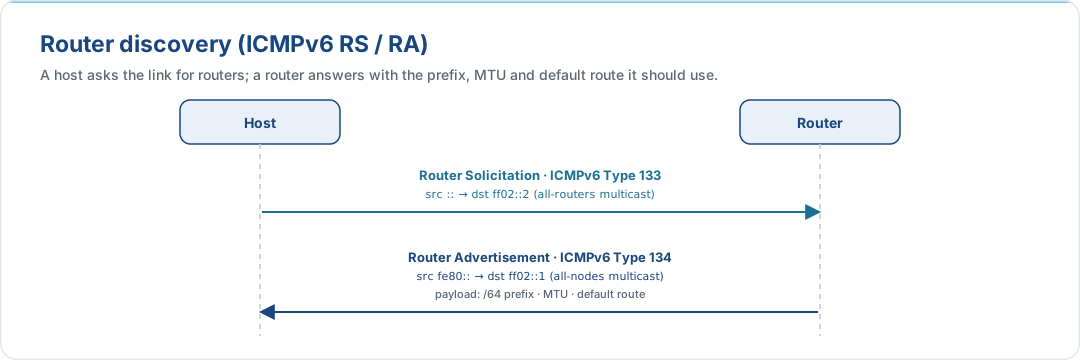
The Router Advertisement is where real configuration arrives. It carries the /64 network prefix, the default gateway, the MTU, and flag bits that control how the host completes its configuration:
| Flag | Meaning |
|---|---|
| M (Managed) | Ignore SLAAC and obtain a full address from a DHCPv6 server |
| O (Other) | Use SLAAC for addressing, but query DHCPv6 for DNS and other parameters |
9.4 Step 3: Duplicate Address Detection
Before the host commits to its new address, it must confirm that nobody else is using it. This is Duplicate Address Detection (DAD, RFC 4862):
- Host sends a Neighbor Solicitation (Type 135) to the solicited-node multicast
address for the target address (
ff02::1:ffXX:XXXX, whereXX:XXXXis the last 24 bits of the target). - Because the destination address embeds the target's low-order bits, the switch forwards the frame to one port, not a broadcast flood.
- If anyone is using the address, they reply with a Neighbor Advertisement (Type 136).
- If no reply arrives, the address is safe to use.
A three-step bootstrap, no DHCP server, no broadcast storm, and a targeted multicast that touches only the relevant port on the switch. This is the protocol working as designed.
ICMPv6 is load-bearing. Every step of SLAAC (Router Solicitation, Router Advertisement, Neighbor Solicitation, Neighbor Advertisement) is an ICMPv6 message. Dropping ICMPv6 at the perimeter is the single most common way that engineers break IPv6 deployments before traffic has a chance to flow. See Misconception 2: Block All ICMP for the allow-list you need.
10. The IPv6 Cheat Sheet: Special Addresses
10.1 Address Type Classification
When you are looking at an address in a log line or a firewall rule, the first question is almost always "what kind of address is this?" The answer is encoded entirely in the leading characters. Five categories cover every address you will meet in practice:
| Address Type | Prefix / Starts With | Primary Function |
|---|---|---|
| Global Unicast | 2000::/3 (starts 2 or 3) |
Public Internet routing, the isp6 allocation |
| Anycast | 2000::/3 (starts 2 or 3) |
Syntactically a unicast; routes to the nearest instance sharing the address |
| Unique Local (ULA) | fc00::/7 (starts fc or fd) |
Intra-organisation only; not routed on the public Internet |
| Link-Local | fe80::/10 (starts fe8–feb) |
Same-link traffic only; never routed |
| Multicast | ff00::/8 (starts ff) |
One-to-group delivery; replaces IPv4 broadcast |
Anycast is the subtle one: it has no dedicated prefix because an anycast address is a Global Unicast address that happens to be assigned to more than one device. You cannot spot an anycast address from the bits alone, only from routing state.
10.2 Named Special Addresses
A short reference of the specific addresses you will encounter most often:
| Address | Purpose |
|---|---|
::/128 |
Unspecified, the placeholder when a host has no address yet (used as source during SLAAC) |
::1/128 |
Loopback, which replaces IPv4's 127.0.0.1; use to test your own TCP/IP stack |
::/0 |
Default route, the "all networks" supernet; replaces IPv4's 0.0.0.0/0 |
ff02::1 |
All-Nodes multicast (link-local), every IPv6 node on the link |
ff02::2 |
All-Routers multicast (link-local), every IPv6 router on the link |
ff02::1:ffXX:XXXX |
Solicited-node multicast, used for address resolution and DAD |
fe80::/10 |
Link-Local scope, required on every active interface |
2000::/3 |
Global Unicast, the routable public Internet |
11. Bringing It Online: A Minimal Router Configuration
A working IPv6 LAN on a typical enterprise router needs three things: IPv6 routing enabled globally, a /64 prefix on the LAN interface, and a stable Link-Local address so hosts can find the gateway by a predictable name.
Router(config)# ipv6 unicast-routing
  ! Enables IPv6 routing and Router Advertisements

Router(config)# interface gigabitethernet 0/0

Router(config-if)# ipv6 address 2001:db8:acad:1::/64 eui-64
  ! Assigns the network prefix; router auto-fills the Interface ID via EUI-64

Router(config-if)# ipv6 address fe80::1 link-local
  ! Statically assigns an easy-to-remember Link-Local gateway address
With those three lines, the router begins advertising Router Advertisements on the LAN. Any SLAAC-capable host plugging into the segment will auto-configure a global address, discover the gateway, run DAD, and be online within seconds, without a DHCP server, without operator intervention, without a per-host inventory spreadsheet.
The transition to IPv6 is not just an expansion of space; it is an evolution in elegance, automation, and efficiency. The blueprint is now yours.
12. Where isp6 Fits and What to Read Next
12.1 The Parts of IPv6 That isp6 Handles for You
Reading this article, you may notice that a large fraction of the "hard" work of IPv6 deployment (RIR registration, prefix allocation, routing object creation, RPKI signing, reverse DNS delegation) is infrastructure that sits above the host and router configuration we have been discussing. That is exactly the part isp6 takes off your plate.
| Activity | Owner |
|---|---|
| RIPE NCC LIR membership and ongoing compliance | isp6 |
| Drawing your /48 or /44 from isp6's RIPE NCC address pool | isp6 |
inet6num and route6 object creation in the RIPE Database |
isp6 |
| RPKI ROA creation and propagation monitoring | isp6 (managed via your subnet dashboard) |
| Reverse DNS delegation for your allocation | isp6 |
| Cryptographic key pair for BYOIP authorisation | isp6 portal + you (you retain the private key) |
| Everything in this article: address planning, routing, host configuration | You |
The value proposition is simple: your allocation arrives already pristine, portable, and registered, with the RIR-facing lifecycle managed through isp6's self-service portal. You focus on the interesting work: addressing hierarchy, cloud BYOIP, firewall policy, dual-stack rollout.
12.2 Where to Go Next
This article is the first stop in the knowledge base. Depending on where you are in the deployment journey, one of the following is probably your next read:
- Planning the hierarchy inside a /48 or /44. Planning Your isp6 Allocation: the estimate / procure / implement arc, the nibble discipline, bisection, and hardening of point-to-point links and loopbacks.
- Bringing IPv4 muscle memory in line with IPv6 reality. Stop Thinking in IPv4: Misconceptions That Sabotage Your IPv6 Deployment: the six reflexes to unlearn before traffic flows.
- Running the programme at organisational scale. Building an IPv6 Integrated Project Team: the cross-functional team structure that determines whether an IPv6 deployment succeeds or stalls at the perimeter firewall.
- Announcing your isp6 allocation from a cloud provider. AWS · Azure · Google Cloud: what isp6 handles, what you configure on the cloud side, cost model, reference architecture, and rollback.
13. References
RFCs
| RFC | Title | Relevance |
|---|---|---|
| RFC 8200 | Internet Protocol, Version 6 (IPv6) Specification | Current IPv6 base specification |
| RFC 4291 | IP Version 6 Addressing Architecture | Address format, scopes, and the /64 Interface ID boundary |
| RFC 5952 | A Recommendation for IPv6 Address Text Representation | Canonical compression rules |
| RFC 4443 | ICMPv6 for IPv6 | Defines the ICMPv6 message types SLAAC relies on |
| RFC 4861 | Neighbor Discovery for IPv6 | Router Solicitation / Advertisement, Neighbor Solicitation / Advertisement |
| RFC 4862 | IPv6 Stateless Address Autoconfiguration (SLAAC) | The three-step bootstrap covered in §9 |
| RFC 6724 | Default Address Selection for IPv6 | The policy table behind the "smallest scope" rule |
| RFC 8981 | Temporary Address Extensions for SLAAC | Privacy Extensions for rotating Interface IDs |
| RFC 4193 | Unique Local IPv6 Unicast Addresses | Defines ULA (fc00::/7) |
RIPE NCC
Related isp6 knowledge base articles
- Planning Your isp6 Allocation: sizing and structuring a /48 or /44
- Stop Thinking in IPv4: Misconceptions That Sabotage Your IPv6 Deployment: the operational mental-model corrections
- Building an IPv6 Integrated Project Team: the organisational frame
- Bring Your Own IPv6 to AWS
- Bring Your Own IPv6 to Azure
- Bring Your Own IPv6 to Google Cloud
Start with space that is yours
Reading about IPv6 only takes you so far. A /48 of your own, registered in the RIPE Database, is the cheapest way to start using it properly.Get your IPv6 space →
This document is provided for informational purposes. Protocol specifications and cloud provider behaviour are subject to change. Consult the linked RFCs and vendor documentation for authoritative, up-to-date information before making architectural decisions.