description: Azure reference architectures for landing your isp6 IPv6 PA assignment in production: a single-region hub-and-spoke pattern with Custom IP Prefix, Azure Firewall, and Applicat
Reference Architectures: Microsoft Azure
Audience: isp6 members and Azure architects who have completed (or are about to complete) the Azure BYOIP / Custom IP Prefix onboarding and want a production-grade topology to land their /48 or /44 on. This article assumes the sizing decision from Sizing: /44 vs /48 has been made.
Last updated: May 2026
1. What's in this article
Two Azure reference architectures, both built around a real isp6 Custom IP Prefix (Azure's name for BYOIP):
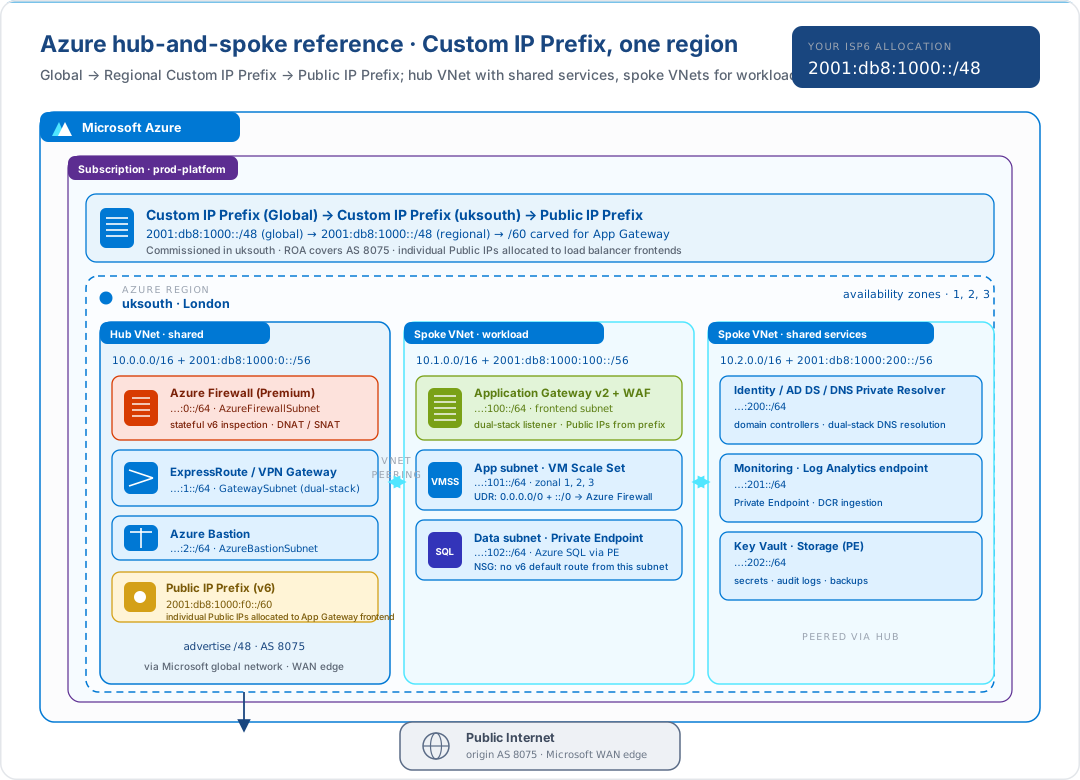
- Architecture A: a single-region production deployment in the hub-and-spoke pattern that Microsoft's Cloud Adoption Framework recommends. One Hub VNet for shared services (Azure Firewall, ER/VPN Gateway, Bastion), and spoke VNets for workloads. Custom IP Prefix in the regional location; a Public IP Prefix carved from it backs the Application Gateway frontend.
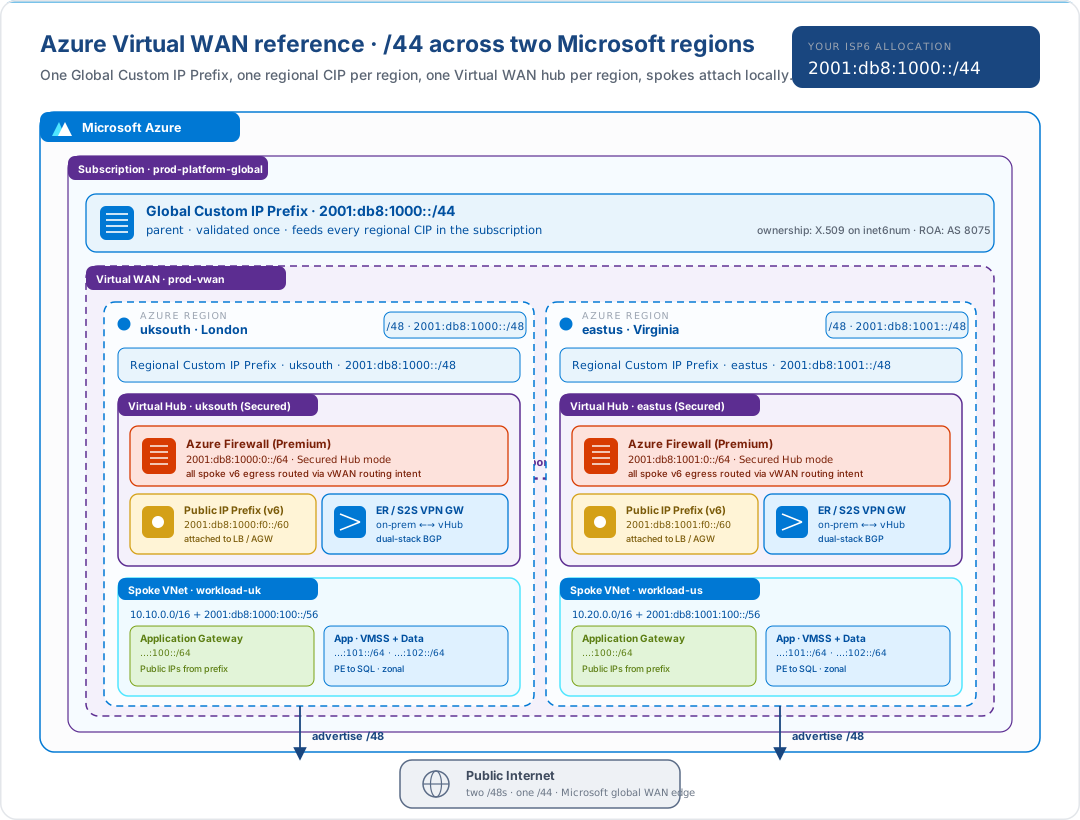
- Architecture B: a multi-region deployment using Azure Virtual WAN. A Global Custom IP Prefix feeds one Regional Custom IP Prefix per region; each region has its own Secured Virtual Hub with Azure Firewall integrated; hub-to-hub connectivity runs over the Microsoft backbone automatically; each region advertises its own /48.
Both architectures show the IPv6 / Custom IP Prefix plane. The hundred other Azure architectural decisions (Entra ID, Defender for Cloud, Policy, Cost Management, governance) sit on top of these unchanged.
For Custom IP Prefix mechanics (signed authorisation message, commissioning
states, RPKI ROA for 8075, regional vs global CIP) read
Bring Your Own IPv6 to Azure.
2. Architecture A: single-region hub-and-spoke
When to choose this: one Azure region serves your traffic, one or a small set of workloads, and you want the canonical Microsoft hub-and-spoke shape that aligns with the Cloud Adoption Framework's "landing zone" design.
2.1 The Custom IP Prefix chain
Azure splits a BYOIP advertisement across three resources, each of which sees a smaller slice of the address space:
| Resource | What it is | What it does |
|---|---|---|
| Global Custom IP Prefix | The top-level resource, the place where the signed authorisation message is provided once | Validates ownership of the /48 (or /44). Does not in itself adv |
| Regional Custom IP Prefix | A region-scoped child of the global CIP | When commissioned in a region, Azure begins announcing the prefix from the Microsoft edge nearest that region |
| Public IP Prefix | A regional sub-allocation (e.g. /60 for IPv6) derived from the regional CIP | Hands out individual Public IP resources to workload-facing things such as Load Balance |
That chain is how Azure separates "you own this prefix" (global) from "this region is announcing it" (regional CIP) from "this resource is using one address out of it" (Public IP from Prefix).
2.2 What each VNet carries
| VNet | IPv6 carve | Purpose |
|---|---|---|
| Hub VNet | …:0::/56 |
Shared services: Azure Firewall (the v6 egress point for every spoke), ER / VPN Gateway, Azure Bastion, and the Public IP Prefix that backs the Application G |
| Workload spoke VNet | …:100::/56 |
Application Gateway (frontend), VMSS / AKS (app), Azure SQL via Private Endpoint (data). UDRs send ::/0 to the Firewall in the hub |
| Shared-services spoke VNet | …:200::/56 |
Identity (AD DS, DNS Private Resolver), monitoring (Log Analytics ingestion endpoint via Private Endpoint), secret stores (Key Vault, Storage via PE) |
VNet peering connects each spoke to the hub. Gateway Transit on the hub side plus Use Remote Gateways on each spoke means the spokes inherit the hub's VPN/ER Gateway without paying for their own.
2.3 Why the Hub is the announce point
The /48 is commissioned in uksouth, the region, not any particular VNet. Microsoft handles the BGP origin (AS 8075) at the regional edge. The hub VNet is conceptually the announce point for diagram purposes, but really the BGP edge is the regional Microsoft network; the hub VNet is just the on-ramp for the Public IP Prefix resources that consume the announced /48.
This is a subtle difference from AWS, where the per-Region advertise-byoip-cidr
call ties an advertisement to a specific account and Region in a more visible way.
3. Architecture B: multi-region with Virtual WAN
When to choose this: two or more Azure regions serve your traffic, you want hub-to-hub connectivity managed for you (rather than maintaining a global VNet peering mesh), and you want a Secured Virtual Hub with Azure Firewall as the egress point per region.
3.1 How Virtual WAN reshapes the diagram
Three things change when you move from a VNet hub to a vWAN Virtual Hub:
- Hub creation is managed. The Virtual Hub is a Microsoft-managed resource inside the Virtual WAN, so you do not maintain a VNet for it, and the routing fabric between hubs is built and operated by Azure.
- Hub-to-hub is automatic. Two Virtual Hubs in the same vWAN form a full mesh over the Microsoft backbone without explicit peering objects. This replaces Global VNet Peering for inter-region private traffic.
- The Firewall sits inside the hub. With Secured Virtual Hub, Azure
Firewall is deployed as part of the hub itself, and Routing Intent is the
one-click way to send all spoke
::/0traffic through it. No UDRs to hand-maintain across spokes.
3.2 One Custom IP Prefix tree, two regions
| Level | Region | Block |
|---|---|---|
| Global Custom IP Prefix | (none, it is global) | 2001:db8:1000::/44 |
| Regional CIP | uksouth | 2001:db8:1000::/48 |
| Regional CIP | eastus | 2001:db8:1001::/48 |
The Global CIP is validated once with the ownership message; each Regional CIP then commissions a /48 from inside it, in its own region. Each Regional CIP becomes a BGP-origin event in its own region. There is no shared advertisement, and a routing problem in one region's /48 does not touch the other's.
3.3 Front Door / Global Load Balancer (optional, deliberately not drawn)
Putting Azure Front Door (or Azure Global Load Balancer) in front of the per-region Application Gateways gives clients an anycast frontend, and is strongly recommended for a real production multi-region service. It is omitted from the diagram to keep the focus on the BYOIP plane. The Front Door endpoint sits above the regional /48s; clients see the Front Door's IPs, and Front Door makes the region selection on each request.
Whether you bring those Front Door IPs from your isp6 allocation is a separate question: Front Door has historically used Microsoft-issued anycast IPs only. Check the current Azure documentation before assuming BYOIP support at the Front Door layer.
4. Azure-specific design rules
Azure-specific gotchas that shape these architectures and that don't apply to AWS or GCP:
- The Global CIP is the ownership root. Lose it and every Regional CIP underneath has to be recreated. Treat it as a Tier-0 resource, with RBAC, locks, resource-group placement, the works.
- A Regional CIP is the BGP-origin object. Decommissioning a Regional CIP withdraws the prefix from that region's edge. Plan deprovisioning before membership lapses or before a cutover; see BYOIP §11.
- Public IP Prefix size on IPv6 is
/60minimum (today). You cannot carve smaller, and that is plenty: a /60 holds 16 individual Public IPs, which is usually 16 LB frontends or 16 VM NICs, more than enough per workload. - NSGs need explicit IPv6 rules. A rule on
0.0.0.0/0does not cover::/0. Audit every NSG when you turn on IPv6, and don't forget the subnet-level NSG and any NIC-level NSGs. - App Gateway requires
EnableHttp2and dual-stack listeners to serve both IPv4 and IPv6 clients from the same frontend; check the App Gateway SKU's current IPv6 status before committing. - vWAN Routing Intent is the way to enforce egress through the Firewall for Architecture B. UDR-based steering across many spokes is brittle by comparison.
- Microsoft's ASN is
8075for every region. The same ASN announces every one of your Regional CIPs. The regional path differentiates them, not the origin AS.
5. What's intentionally out of scope
| Topic | Where to read |
|---|---|
| BYOIP / Custom IP Prefix onboarding, costs, lifecycle | Bring Your Own IPv6 to Azure |
| Sizing decision (/48 vs /44) | Sizing: /44 vs /48 |
| Internal /48 carving (bit-budget method) | Planning Your isp6 Allocation |
| Landing-zone identity, governance, policy | Cloud Adoption Framework: Azure landing zones |
| Operational excellence, reliability, security | Microsoft Azure Well-Architected Framework |
The IPv6 / Custom IP Prefix layer slots underneath those frameworks without changing their conclusions.
6. Further reading
Other reference architectures in this series
- Reference Architectures: An Overview
- Reference Architectures: AWS
- Reference Architectures: Google Cloud
- Reference Architectures: On-Premises and Colocation
isp6 knowledge base
- Bring Your Own IPv6 to Azure: Custom IP Prefix mechanics, ownership, ROAs, costs
- Sizing: /44 vs /48
- Planning Your isp6 Allocation
Microsoft documentation
- Custom IP address prefix overview
- IPv6 for Azure Virtual Network
- Public IP addresses
- Virtual WAN: Secured Virtual Hub
- Hub-spoke network topology: Cloud Adoption Framework
- Microsoft Azure Well-Architected Framework
IETF
- RFC 6177: IPv6 Address Assignment to End Sites
- RFC 7454: BGP Operations and Security
- RFC 3849: IPv6 Address Prefix Reserved for Documentation
7. Custom IP Prefix rollout: quick checklist
If your /48 isn't routable, a Public IP can't be drawn from your prefix, or az network custom-ip prefix show returns a state you weren't expecting, walk through this in order. Each st
The commands below use the
2001:db8::/48documentation prefix (RFC 3849),uksouthas the region, andisp6-byoip-rgas the resource group. Substitute your real isp6/48, target region, and resource group. Azure Custom IP Prefix CLI behaviour, return codes, and state-machine transitions are defined by Microsoft and may change, so treat the Azure references listed at the end of this section as authoritative.
Step 1: generate the signed authorisation in the isp6 console
In the subnet dashboard for the /48 you're bringing to Azure, the cloud panel produces two values using the private key from your onboarding step 9:
signed_message: the RSA signature over the Azure-format authorisation string (ROA + ownership message)auth_certificate: the X.509 ownership certificate Azure validates the signature against
Both are required by az network custom-ip prefix create. Re-generating is idempotent and safe, so produce fresh values whenever an older signature is rejected.
Step 2: create the Custom IP Prefix (provisions and starts validation)
az network custom-ip prefix create \
  --name isp6-byoip-48 \
  --resource-group isp6-byoip-rg \
  --location uksouth \
  --cidr 2001:db8::/48 \
  --signed-message "$signed_message" \
  --auth-certificate "$auth_certificate"
Azure verifies ownership against the ROA. Validation can take minutes to hours. The prefix transitions through Provisioning → Provisioned. Until it reaches Provisioned, you cannot commission it.
For the multi-region Architecture B, add --is-parent (global parent) on the first create and then create per-region children with --custom-ip-prefix-parent referencing the parent's resource ID.
Step 3: commission the prefix (starts BGP advertisement)
az network custom-ip prefix update \
  --name isp6-byoip-48 \
  --resource-group isp6-byoip-rg \
  --commission
This is the BGP-advertisement switch. Until it runs, traffic destined for your prefix won't reach Azure even though the prefix exists. The commissionedState transitions Provisioned → Commissioning → Commissioned. Reversible via --decommission.
Step 4: verify with the describe call
az network custom-ip prefix show \
  --name isp6-byoip-48 \
  --resource-group isp6-byoip-rg \
  --query '{cidr:cidr, provisioningState:provisioningState, commissionedState:commissionedState, publicIpPrefixes:publicIpPrefixes[].id}' \
  -o jsonc

az network custom-ip prefix list \
  --resource-group isp6-byoip-rg \
  -o table
Expected output on a healthy rollout:
provisioningState: Succeededmeans the ARM-level resource is in place.commissionedState: Commissionedmeans BGP advertisement is live. Anything else (Provisioned,Commissioning,Decommissioning,Decommissioned,CommissionedNoInternetAdvertise) mea- The
cidrfield matches your isp6/48exactly (no trimming, no auto-aggregation).
Public IP Prefixes drawn from this Custom IP Prefix appear under publicIpPrefixes. Until at least one Public IP Prefix is created and a Public IP allocated from it, no Azure resource is actually using your /48.
Common failure modes
| Symptom | Likely cause |
|---|---|
az network custom-ip prefix create returns InvalidAuthorizationMessage |
Stale or mis-copied signed_message / auth_certificate. Re-generate in the isp6 console and retry. |
Stuck in Provisioning for >2h |
Microsoft-side validation queue is slow, or your ROA doesn't list ASN 8075 (the Microsoft ASN). |
--commission returns CommissionFailed |
Validation completed but BGP-side onboarding failed. Open a Microsoft support case with the prefix resource ID; the customer cannot self-dia |
| Prefix not reachable from the public internet | commissionedState is not yet Commissioned, or no Public IP from this prefix has been associated with a frontend (Application Gateway, Load Balancer, Azure Firewall). |
| Cannot create a Public IP Prefix from the CIP | The CIP is Provisioned but not Commissioned. Commission first, then create derived Public IP Prefixes. |
Authoritative references
Microsoft owns this lifecycle end-to-end. If anything in this checklist disagrees with Microsoft's documentation, Microsoft wins:
- Custom IP address prefix overview
- Create a Custom IP Prefix: IPv6 (CLI)
- Create a Custom IP Prefix: IPv6 (Portal)
- Manage a Custom IP Prefix
az network custom-ip prefix: Azure CLI reference
This document is provided for informational purposes. Protocol specifications and cloud provider behaviour are subject to change. Consult the linked RFCs and vendor documentation for authoritative, up-to-date information before making architectural decisions.